Product Page
Mikroduino Nano Trainer Board Pakistan – Arduino Learning | microsolution.com.pk
₨ 13,500
[yith_wcwl_add_to_wishlist]
Need some help?
Contact Us
Product Ships in
2-3-business Days
Payment Methods:

Mikroduino Nano — Arduino Nano Trainer Development Board And Learning Shield Board Made
Product Introduction
Pakistan's electronics education sector demands practical, hands-on learning tools that prepare students for real-world challenges. The Mikroduino Nano — Arduino Nano Trainer Development Board And Learning Shield Board Made by Mikrotronics delivers exactly what learners and professionals need to master embedded systems . This all-in-one development shield eliminates messy breadboard wiring and accelerates your learning journey.
Students across Pakistan's universities struggle with unreliable wiring and complex setups. The Mikroduino Nano — Arduino Nano Trainer Development Board And Learning Shield Board Made solves this problem by integrating everything onto one well-organized PCB. You simply plug in your Arduino Nano and start experimenting immediately. The clean, labeled silkscreen guides you through every connection .
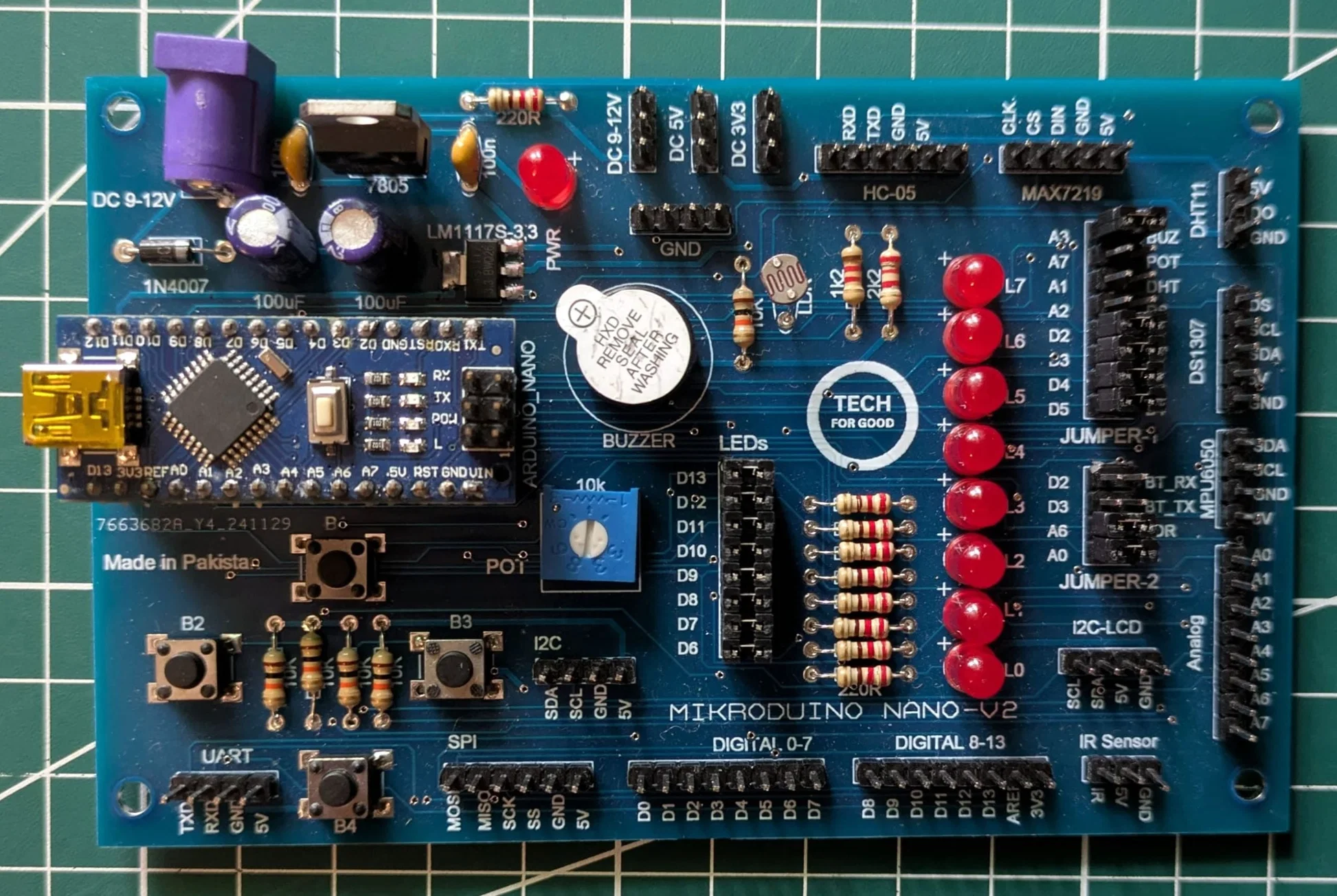
This Mikroduino Nano — Arduino Nano Trainer Development Board And Learning Shield Board Made includes a rich array of onboard components. You get eight red LEDs with current-limiting resistors, a piezo buzzer for audio feedback, an LDR for light sensing, a 10k potentiometer for analog input testing, and four tactile push buttons . These components let you explore input, output, and analog processing without purchasing extra parts.
The Pakistan market demands affordable yet high-quality educational tools. This Mikroduino Nano — Arduino Nano Trainer Development Board And Learning Shield Board Made delivers exceptional value, combining premium features at a competitive price point. Students in Lahore, Karachi, and Islamabad can access this powerful learning platform without straining their budgets.
Professionals appreciate the board's comprehensive connectivity options. The Mikroduino Nano — Arduino Nano Trainer Development Board And Learning Shield Board Made features HC-05 Bluetooth module headers, DS1307 RTC socket, DHT11 sensor header, IR sensor breakout, MAX7219 LED driver header, OLED display header, and I2C LCD header . This versatility transforms the board from a simple trainer into a complete prototyping platform.
Quality and durability set this Mikroduino Nano — Arduino Nano Trainer Development Board And Learning Shield Board Made apart from alternatives. The compact PCB includes mounting holes for secure installation. The reverse polarity protection and on-board voltage regulators ensure your projects remain safe from common power issues . You invest in a board that withstands the demands of repeated student use.
The Mikroduino Nano — Arduino Nano Trainer Development Board And Learning Shield Board Made features full access to all digital and analog pins. You connect external sensors, actuators, and displays through clearly labeled headers. The SPI and I2C breakout headers expand your possibilities further, enabling complex IoT and embedded projects.
Makers and hobbyists across Pakistan choose this Mikroduino Nano — Arduino Nano Trainer Development Board And Learning Shield Board Made for rapid prototyping. The board eliminates the frustration of debugging breadboard connections. You focus on coding and innovation rather than troubleshooting loose wires. This efficiency accelerates your project development significantly.
Teachers setting up electronics labs trust this Mikroduino Nano — Arduino Nano Trainer Development Board And Learning Shield Board Made for their classrooms. The all-in-one design simplifies lab management and reduces component loss. Students spend more time learning and less time searching for parts. The board's robust construction ensures it survives the academic year.
Your Arduino Nano projects deserve a professional development platform. This Mikroduino Nano — Arduino Nano Trainer Development Board And Learning Shield Board Made provides the perfect foundation for learning, prototyping, and teaching. Join Pakistan's growing maker community and start building impressive projects today.
2️⃣ Key Features
-
Eliminate messy breadboard wiring with this all-in-one Arduino Nano trainer development shield .
-
Plug your Arduino Nano directly into the onboard socket for instant compatibility.
-
Visualize program status using eight red LEDs with built-in 220Ω current-limiting resistors .
-
Generate audio feedback using the onboard piezo buzzer for interactive projects .
-
Sense ambient light levels using the integrated LDR with 10k pull-down resistor .
-
Test analog inputs easily using the onboard 10k potentiometer .
-
Interact with your projects using four tactile push buttons for user input .
-
Connect wireless modules using the dedicated HC-05 Bluetooth header .
-
Monitor real-time data with the DS1307 RTC module socket .
-
Measure temperature and humidity using the DHT11 sensor header .
-
Integrate IR sensors using the onboard breakout header .
-
Control LED matrices using the MAX7219 LED driver header .
-
Display project information on OLED displays using the I2C header .
-
Interface character LCDs using the dedicated I2C LCD header .
-
Access all digital pins D0 through D13 via labeled breakout headers .
-
Access all analog pins A0 through A7 via labeled breakout headers .
-
Power your projects safely using onboard 5V and 3.3V voltage regulators .
-
Protect your board with reverse polarity protection using the 1N4007 diode .
-
Mount the board securely using the provided mounting holes .
-
Learn embedded systems effectively with everything organized on one compact PCB.
3️⃣ Advanced Features
-
Design professional IoT prototypes using the comprehensive onboard sensor interfaces.
-
Develop real-time clock applications with the DS1307 RTC module socket and I2C pins .
-
Implement Bluetooth communication using the dedicated HC-05 module header .
-
Create wireless projects with UART breakout headers for serial communication .
-
Monitor environmental conditions using the DHT11 temperature and humidity sensor interface .
-
Build LED matrix displays with the SPI-based MAX7219 driver header .
-
Develop OLED-based interfaces using the I2C breakout header .
-
Create robotic projects with the IR sensor breakout for obstacle detection .
-
Build data logging applications using the I2C and SPI communication protocols.
-
Develop interactive installations using all digital and analog I/O pins .
-
Create multi-sensor systems with the SPI and I2C breakout headers .
-
Implement audio feedback in your projects using the onboard buzzer .
-
Design light-sensitive circuits using the integrated LDR .
-
Develop automated systems using all four tactile push buttons .
-
Create analog-controlled applications with the 10k potentiometer .
-
Build portable devices using the compact PCB form factor with mounting holes .
-
Develop low-power projects using the efficient 5V and 3.3V regulators .
-
Create robust systems with reverse polarity protection for safety .
-
Design professional prototypes that transition seamlessly to final products.
-
Build complete embedded systems using the board's all-in-one design .
4️⃣ Frequently Asked Questions
Q1: What is the Mikroduino Nano — Arduino Nano Trainer Development Board And Learning Shield Board Made?
Answer: This is an all-in-one Arduino Nano trainer shield manufactured by Mikrotronics in Pakistan. It integrates multiple components, sensors, and interfaces onto a single PCB for easy learning and prototyping .
Q2: What components are included on this trainer board?
Answer: The board includes eight LEDs, a piezo buzzer, LDR, 10k potentiometer, four push buttons, and headers for Bluetooth, RTC, DHT11, IR sensor, MAX7219, OLED, and I2C LCD .
Q3: Is this board compatible with the Arduino Nano?
Answer: Yes, the board features an onboard socket designed specifically for the Arduino Nano . You simply plug your Nano into the socket and start using the trainer.
Q4: Do I need to buy an Arduino Nano separately?
Answer: Yes, the board does not include the Arduino Nano. You need to provide your own Nano to use the trainer board .
Q5: What power supply does this board require?
Answer: The board accepts 9-12V DC input via a barrel jack. Onboard 7805 and LM1117S-3.3 regulators provide stable 5V and 3.3V outputs .
Q6: Is this board suitable for beginners?
Answer: Absolutely. The board is specifically designed for students, hobbyists, and electronics enthusiasts learning Arduino programming . The labeled silkscreen guides you through every connection.
Q7: Can I access all Arduino Nano pins through this board?
Answer: Yes, the board breaks out all digital pins D0-D13 and analog pins A0-A7 through labeled headers .
Q8: What communication protocols does this board support?
Answer: The board supports SPI, I2C, and UART protocols through dedicated breakout headers .
Q9: Who manufactures this board?
Answer: Mikrotronics manufactures this board in Pakistan . The quality and design specifically meet the needs of the local market.
Q10: Can teachers use this board in classroom settings?
Answer: Yes, this board is perfect for teachers setting up electronics labs. The all-in-one design simplifies lab management and reduces component loss .
5️⃣ Where It Can Be Used
-
University Engineering Labs: Students practice embedded systems programming using this comprehensive trainer board.
-
School STEM Programs: Teachers introduce electronics and programming concepts with ready-to-use hardware .
-
Hobbyist Workshops: Makers build interactive projects using the board's multiple sensors and output devices.
-
Professional Prototyping: Engineers develop proof-of-concept projects for IoT and embedded applications.
-
Research Projects: Academic researchers create experimental setups using the board's versatile interfaces .
-
Technical Training Centers: Vocational institutes teach Arduino programming with consistent, reliable hardware .
-
Self-Learning Environments: Independent learners explore electronics fundamentals using guided tutorials.
-
Robotics Competitions: Students prepare for competitions using the board's motor control and sensor capabilities.
-
Home Automation Development: Hobbyists create smart home systems with Bluetooth and sensor integration .
-
Interactive Installations: Artists and designers build interactive exhibits using the board's input and output features.
6️⃣ How to Use
Step 1: Gather Your Components
You need an Arduino Nano to use this trainer board. The board itself comes as a complete development shield with all components integrated . Ensure you have a USB cable for programming and a 9-12V power adapter for external power.
Step 2: Install the Arduino Nano
Carefully insert your Arduino Nano into the onboard socket. Ensure proper alignment of the pins with the socket. The board accepts standard Arduino Nano pin configurations .
Step 3: Set Up Programming Environment
Download and install the Arduino IDE on your computer. Install the necessary board definitions for Arduino Nano. Connect the trainer board to your computer via USB cable through the Arduino Nano.
Step 4: Test Onboard Components
Write simple programs to test each onboard component. Start with blinking the red LEDs, then add the buzzer for sound, and finally test the push buttons and potentiometer . This confirms all components work correctly.
Step 5: Add Sensors and Modules
Connect external modules using the onboard headers. Insert the HC-05 Bluetooth module for wireless control. Add the DHT11 sensor for environmental monitoring. Connect the OLED display for visual output . The headers make these connections simple and reliable.
Step 6: Start Your Project
Combine components to build your complete project. Upload your code and test all functionality. The labeled silkscreen guides you to the correct connections . Troubleshoot by checking individual components systematically.
Safety Tips:
-
Always disconnect power when inserting or removing the Arduino Nano.
-
Verify connections before applying power to avoid short circuits.
-
Handle the board carefully to prevent static discharge damage.
-
Use the recommended 9-12V power supply to avoid damaging the voltage regulators .
Maintenance Guidance:
-
Clean the board gently using a soft brush to remove dust.
-
Store the board in a dry place away from moisture.
-
Check connections periodically for secure contact.
-
Update the Arduino IDE regularly for the latest features.
7️⃣ Advantages
-
Complete Learning Platform: This trainer eliminates the need for separate components and breadboards .
-
Cost-Effective Solution: The bundled design costs less than purchasing individual components separately.
-
Time Efficiency: Start prototyping immediately without setting up complex circuits.
-
Reliable Connections: Soldered components eliminate unreliable breadboard connections .
-
Educational Value: The labeled silkscreen helps students learn component functions .
-
Versatile Interfaces: Multiple sensor and module headers support various projects .
-
Professional Quality: PCB design with mounting holes ensures durability .
-
Safety Features: Reverse polarity protection and voltage regulators protect your projects .
-
Pakistan-Made: Designed for the local market with quality and affordability in mind .
-
Scalability: Transition from learning to professional prototyping seamlessly.
8️⃣ Disadvantages
-
Arduino Nano Required: You need to purchase the Arduino Nano separately.
-
Limited Component Variety: Some users may want different sensors not included onboard.
-
Fixed Layout: You cannot reposition components like on a breadboard.
-
Learning Curve: Beginners still need to understand basic electronics principles.
-
No Battery Included: External power supply required for portable projects.
-
Soldered Components: Damaged components require desoldering and replacement.
-
Space Limitations: The board cannot accommodate very large custom circuits.
-
Higher Cost: More expensive than buying only essential components for a single project.
-
Limited Documentation: Users may need to supplement with online resources.
-
Availability Issues: Local suppliers may have stock limitations.
9️⃣ City-Wise Sales Coverage in Punjab
The Mikroduino Nano — Arduino Nano Trainer Development Board is now available across Punjab, Pakistan. We deliver to Lahore, Faisalabad, Rawalpindi, Multan, Gujranwala, Sialkot, Bahawalpur, Sargodha, Rahim Yar Khan, Sheikhupura, Jhang, Dera Ghazi Khan, Gujrat, Okara, Kasur, Sahiwal, Khanewal, Chiniot, Pakpattan, and Vehari. Students in Lahore's engineering universities and professionals in Faisalabad's industrial sector can access this educational board quickly. The widespread availability ensures every city in Punjab receives prompt delivery for educational institutions, hobbyists, and businesses developing embedded systems projects .
Mikroduino Nano Trainer Board Pakistan - Arduino Learning Buy Mikroduino Nano — Arduino Nano Trainer Development Board And Learning Shield Board Made in Pakistan. All-in-one learning shield with sensors, LEDs, buzzer. Available across Punjab. Mikroduino Nano, Arduino Nano Trainer Pakistan, Arduino Learning Shield, Development Board Pakistan, Arduino Nano Shield, Mikrotronics Pakistan, Arduino Trainer Kit, Electronics Learning Board, Embedded Systems Pakistan, Arduino Nano Board, STEM Education Pakistan, IoT Prototyping, Pakistan Electronics, Arduino Sensors, Microcontroller Training