Product Page
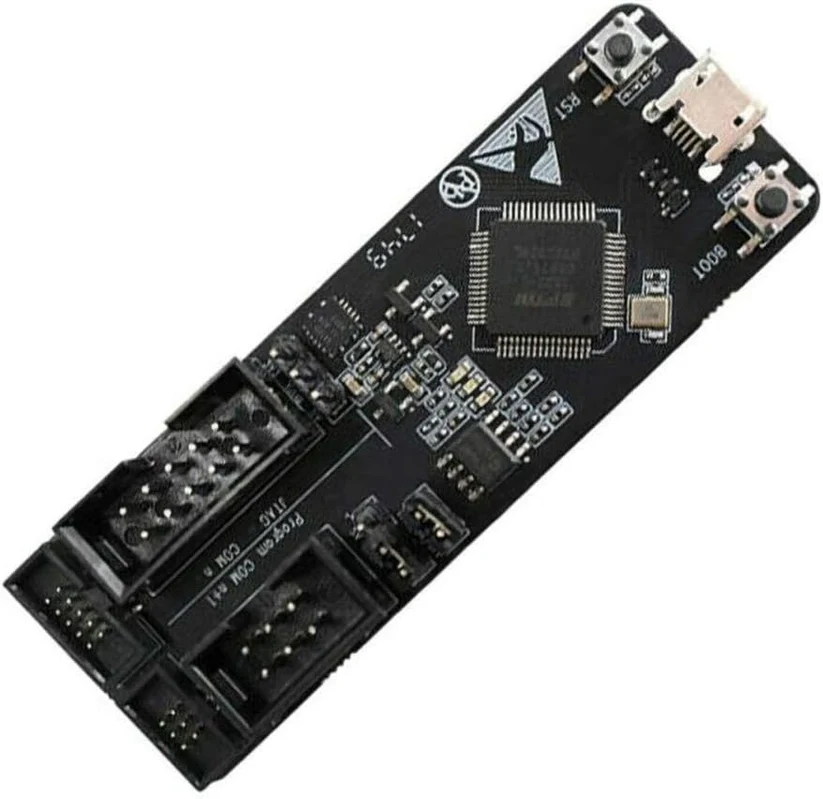
ESP-Prog Program Downloader & JTAG Debugger for ESP8266 ESP32
₨ 15,000
[yith_wcwl_add_to_wishlist]
Need some help?
Contact Us
Product Ships in
2-3-business Days
Payment Methods:

ESP-Prog Program Downloader & JTAG Debugger for ESP8266 ESP32 | microsolution.com.pk
Product Introduction
Are you tired of struggling with complex firmware uploads and debugging sessions for your ESP projects? The On Demand ESP-Prog Program Downloader Automatic JTAG Debugging Board for ESP8266 ESP32 provides the perfect solution. We designed this powerful tool to simplify your development workflow and save you valuable time.
This official Espressif development debugger combines automatic firmware downloading, reliable serial communication, and advanced JTAG online debugging into one compact device . Whether you are a university student in Lahore working on your final year project or a professional developer in Karachi creating commercial IoT products, this tool will significantly boost your productivity.
The On Demand ESP-Prog Program Downloader Automatic JTAG Debugging Board for ESP8266 ESP32 connects to your computer using just a single USB cable . You no longer need to manage multiple connections or struggle with unreliable programming methods. Your computer instantly recognizes the board and identifies separate ports for both the Program and JTAG functions.
What makes this board truly special is its automatic download capability. When you connect the On Demand ESP-Prog Program Downloader Automatic JTAG Debugging Board for ESP8266 ESP32 to your target board, the download program automatically controls the reset and boot mode selection pins . This means you can execute download commands and watch your device automatically download and run firmware without any manual button pressing.
We understand the Pakistani market faces unique challenges with power fluctuations and component availability. The On Demand ESP-Prog Program Downloader Automatic JTAG Debugging Board for ESP8266 ESP32 addresses these concerns with its robust power compatibility. You can select either 5V or 3.3V power output through the pin headers to match different user board requirements . This flexibility ensures the board works reliably with various ESP8266 and ESP32 development boards available in Pakistan.
The build quality reflects Espressif's engineering excellence. The board uses a high-quality FT2232HL USB bridge chip that provides transfer rates up to 3 Mbps . Professional developers in Islamabad and Rawalpindi will appreciate the JTAG debugging functionality, which enables in-circuit debugging for ESP32, ESP32-S2, ESP32-S3, and ESP32-C3 platforms .
Students and hobbyists will love the simplicity of the On Demand ESP-Prog Program Downloader Automatic JTAG Debugging Board for ESP8266 ESP32. You do not need to be an expert to use this tool effectively. The board comes with clearly labeled interfaces and simple setup instructions. The foolproof connector design prevents incorrect connections, protecting both your debugger and target boards.
For businesses in Pakistan investing in IoT development, this tool represents exceptional value. It reduces development time, minimizes troubleshooting headaches, and ensures your team can focus on creating innovative applications rather than fighting with programming tools. The durable construction withstands regular use in busy workshops and labs.
The On Demand ESP-Prog Program Downloader Automatic JTAG Debugging Board for ESP8266 ESP32 works with Windows, Linux, and macOS systems, making it compatible with the diverse setups in Pakistani universities and companies. It supports both the older ESP8266 and newer ESP32 platforms, giving you a single tool for all your ESP projects.
LED indicators on the board provide clear visual feedback. The red LED lights up when the 3.3V power is connected, the green LED indicates data transmission, and the blue LED shows data reception . These status lights help you quickly verify proper operation without using additional test equipment.
The On Demand ESP-Prog Program Downloader Automatic JTAG Debugging Board for ESP8266 ESP32 includes both 2.54mm and 1.27mm pitch connectors, ensuring compatibility with various target board designs . This attention to detail makes the board suitable for both prototyping and production environments.
2️⃣ Key Features
-
Connects instantly to your computer using just one USB cable for both power and data transfer.
-
Automates firmware downloads to ESP8266 and ESP32 boards without manual button sequences.
-
Enables JTAG debugging for professional in-circuit analysis on ESP32 platforms.
-
Supports serial communication for reliable data exchange between your computer and target device.
-
Provides selectable power output of either 5V or 3.3V to match your target board's voltage requirements.
-
Includes foolproof connectors that prevent incorrect cable connections and protect your hardware.
-
Delivers high-speed data transfer with the FT2232HL chip providing up to 3 Mbps throughput.
-
Works across operating systems including Windows, Linux, and macOS for universal compatibility.
-
Shows clear status indicators with red, green, and blue LEDs for power and data activity.
-
Saves development time by eliminating manual reset and boot mode selection.
-
Prevents connection errors with keyed connectors that ensure correct orientation every time.
-
Supports multiple ESP chips including ESP8266, ESP32, ESP32-S2, and ESP32-S3.
-
Offers dual connector pitch options with 2.54mm and 1.27mm for different board designs.
-
Includes manual reset and boot buttons for situations requiring manual control.
-
Features robust build quality that withstands frequent use in busy development environments.
-
Reduces setup time with plug-and-play operation requiring no complex configuration.
-
Provides power compatibility for different user boards through adjustable voltage selection.
-
Enables remote debugging through standard JTAG protocols with OpenOCD support.
-
Streamlines firmware testing with automatic download and execution capabilities.
-
Comes in compact form factor that saves desk space in your workshop or lab.
3️⃣ Advanced Features
-
Uses premium FT2232HL USB bridge for reliable multi-channel communication and stable operation.
-
Implements automatic download circuitry that controls reset and boot pins without manual intervention.
-
Features delay circuit technology ensuring proper JTAG signal timing during power-up sequences.
-
Provides independent power selection for both Program and JTAG interfaces.
-
Supports ESP-IDF development environment for seamless integration with official Espressif tools.
-
Enables advanced in-circuit debugging through OpenOCD and GDB server compatibility.
-
Offers dual port capability with separate port identification for Program and JTAG functions.
-
Includes strapping pin configuration through IO0 On/Off jumper for boot mode control.
-
Uses industrial-grade components ensuring long-term reliability and consistent performance.
-
Features anti-static packaging protecting the board during storage and transport.
-
Supports high-speed firmware programming reducing production testing time significantly.
-
Provides accurate signal timing for stable JTAG communication even in noisy environments.
-
Incorporates power regulation circuitry for clean, stable output voltage to target boards.
-
Allows flexible target board design with 6-pin Program and 10-pin JTAG connection options.
-
Features PCB design optimized for minimal signal interference and maximum reliability.
-
Supports continuous operation suitable for production line programming and testing.
-
Includes protective components preventing damage from accidental short circuits.
-
Enables simultaneous download and debug without reconnecting cables.
-
Maintains consistent 3.3V signal levels even when selecting different interface voltages.
-
Works with Espressif's software tools providing official support and regular updates.
4️⃣ Frequently Asked Questions
Q1: What is the On Demand ESP-Prog Program Downloader Automatic JTAG Debugging Board for ESP8266 ESP32 used for?
Answer: This tool programs firmware onto ESP8266 and ESP32 boards and provides JTAG debugging capabilities for professional development and troubleshooting.
Q2: Does this work with both ESP8266 and ESP32?
Answer: Yes, the On Demand ESP-Prog Program Downloader Automatic JTAG Debugging Board for ESP8266 ESP32 supports automatic download and serial communication for both platforms .
Q3: What operating systems does this board support?
Answer: The board works with Windows, Linux, and macOS systems through standard USB drivers .
Q4: Do I need special cables to connect this programmer?
Answer: The On Demand ESP-Prog Program Downloader Automatic JTAG Debugging Board for ESP8266 ESP32 includes flat cables for connection, though you need a standard USB cable for computer connection .
Q5: What power output options does this board provide?
Answer: You can select either 5V or 3.3V power output using the pin headers for compatibility with different target boards .
Q6: Can beginners use this programming tool?
Answer: Absolutely, the On Demand ESP-Prog Program Downloader Automatic JTAG Debugging Board for ESP8266 ESP32 features simple setup and automatic download functions that make it beginner-friendly.
Q7: Does this support JTAG debugging for ESP8266?
Answer: JTAG debugging works with ESP32 and newer chips, while ESP8266 supports automatic download and serial communication functions .
Q8: How does the automatic download feature work?
Answer: The board automatically controls reset and boot pins when you execute a download command, eliminating manual button pressing .
Q9: Is this an original Espressif product?
Answer: Yes, the On Demand ESP-Prog Program Downloader Automatic JTAG Debugging Board for ESP8266 ESP32 is an official Espressif development and debugging tool.
Q10: What connectors does this programmer use?
Answer: The board provides both 2.54mm and 1.27mm pitch connectors for Program and JTAG interfaces .
5️⃣ Where It Can Be Used
-
University electronics labs for teaching embedded systems and IoT development courses.
-
Product development companies creating commercial IoT devices for smart home applications.
-
Research and development facilities developing new ESP-based products and prototypes.
-
Professional engineering workshops offering firmware development and debugging services.
-
Hobbyist maker spaces providing members with reliable programming tools.
-
Small businesses developing custom automation and control systems.
-
Freelance developers working on client projects requiring ESP programming.
-
Manufacturing facilities programming ESP modules during production and quality testing.
-
Government research institutions developing IoT solutions for various applications.
-
Technical training centers offering practical courses on ESP development and debugging.
6️⃣ How to Use
Getting started with your On Demand ESP-Prog Program Downloader Automatic JTAG Debugging Board for ESP8266 ESP32 is straightforward and beginner-friendly.
Step 1: Install the USB Driver
Connect your programmer to your computer using a standard USB cable. Ensure you use a cable that supports data transfer, not just charging . Your computer should automatically detect the FT2232HL chip. If not, download and install the FT2232HL driver from the official website. Once installed, your computer will show two separate ports for the Program and JTAG functions.
Step 2: Select the Correct Voltage
Examine your target board to determine its operating voltage. Use the PROG PWR SEL and JTAG PWR SEL pin headers to select either 3.3V or 5V output . Match this selection to your target board's requirements to avoid damaging your components.
Step 3: Connect the Programmer to Your Target Board
Use the appropriate flat cable provided with the programmer. The 2.54mm pitch connector works with standard development boards, while the 1.27mm pitch connector suits compact designs . Connect the Program interface to your target board's 6-pin connector, and the JTAG interface to the 10-pin connector if needed. The foolproof design prevents incorrect connections.
Step 4: Launch Your Development Software
Open your preferred development environment such as ESP-IDF, PlatformIO, or Arduino IDE. Configure the software to recognize the COM ports assigned to your programmer. The port with the higher number typically represents the Program interface.
Step 5: Execute Download Commands
Write your firmware code and compile it. When you execute the download command, the On Demand ESP-Prog Program Downloader Automatic JTAG Debugging Board for ESP8266 ESP32 automatically handles the reset and boot mode selection . You will see the green LED flashing during data transmission and the blue LED during data reception.
Step 6: Advanced Debugging
For complex projects, use JTAG debugging with OpenOCD and GDB. The board supports in-circuit debugging on ESP32 platforms, allowing you to set breakpoints, inspect variables, and trace execution.
Safety Tips
Always power off your target board before connecting or disconnecting cables. Ensure proper voltage selection before powering on. Store the programmer in its anti-static packaging when not in use. Keep the board away from moisture and extreme temperatures.
7️⃣ Advantages
-
Saves significant development time through automatic firmware download and debugging capabilities.
-
Reduces troubleshooting effort with reliable, consistent programming results every time.
-
Protects your investment with robust build quality and durable component selection.
-
Provides professional debugging features usually found only in expensive development tools.
-
Delivers excellent value for Pakistani developers compared to importing similar tools.
-
Eliminates manual programming steps that often cause errors and frustration.
-
Enables faster prototyping cycles through streamlined download and test workflows.
-
Supports multiple chip platforms including ESP8266, ESP32, and newer variants.
-
Improves code quality through advanced JTAG debugging capabilities.
-
Offers long-term reliability with official Espressif design and manufacturing.
8️⃣ Disadvantages
-
Requires driver installation on Windows systems, which may need administrative privileges.
-
Limited to Espressif platforms and cannot be used for other microcontroller brands.
-
Needs compatible USB cables as some cables only provide charging without data lines .
-
Can be bulky compared to smaller USB-to-serial adapters for basic programming tasks.
-
Higher cost than basic programmers due to advanced JTAG debugging features.
-
Requires learning curve for mastering JTAG debugging and advanced features.
-
May need custom cables for non-standard target board connections.
-
Power selection requires care as incorrect voltage can damage target boards.
-
JTAG debugging limited to newer ESP chips and not available for ESP8266.
-
Manual button operation still necessary for some boot mode scenarios.
9️⃣ City-Wise Sales Coverage in Punjab
The On Demand ESP-Prog Program Downloader Automatic JTAG Debugging Board for ESP8266 ESP32 is available throughout Punjab province. We ship to major cities including Lahore, Faisalabad, Rawalpindi, Multan, Gujranwala, Sialkot, Bahawalpur, Sargodha, Rahim Yar Khan, Sheikhupura, Jhang, Dera Ghazi Khan, Gujrat, Okara, Kasur, Sahiwal, Khanewal, Chiniot, Pakpattan, and Vehari. Students, professionals, and businesses across Punjab can order this essential development tool and receive it quickly anywhere in the province.
ESP-Prog Program Downloader & JTAG Debugger for ESP8266 ESP32 Buy the On Demand ESP-Prog Program Downloader Automatic JTAG Debugging Board for ESP8266 ESP32 in Pakistan. Professional programming and debugging tool for ESP development. ESP-Prog, program downloader, JTAG debugging board, ESP8266 programmer, ESP32 debugger, automatic firmware downloader, ESP development tool, Espressif programmer, Pakistan ESP tool, IoT programmer Pakistan, ESP32 JTAG debugger, ESP8266 automatic programmer, professional ESP tool, in-circuit debugger, USB programmer ESP