Product Page
ESP32 Cam MB CH340G Micro USB Programmer | Buy in Pakistan
₨ 1,600
[yith_wcwl_add_to_wishlist]
Need some help?
Contact Us
Product Ships in
2-3-business Days
Payment Methods:

ESP32 Cam MB CH340G Micro USB Programmer | Buy in Pakistan - microsolution.com.pk
Product Introduction
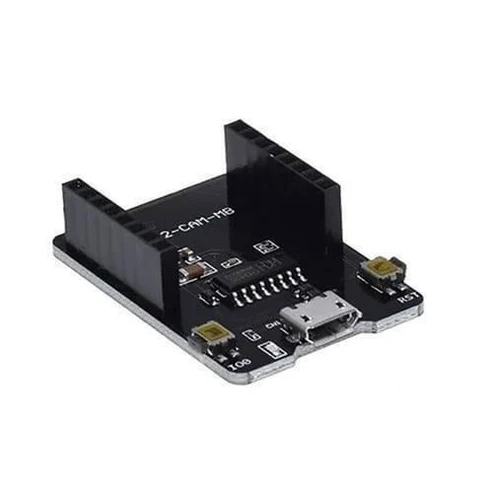
Pakistani engineers, students, and IoT enthusiasts now have the perfect tool for programming their ESP32-CAM modules. The ESP32 Cam Mb Micro USB Programmer CH340G USB To Serial Port Board eliminates the complicated wiring that traditionally frustrates developers. This programmer shield connects directly to your ESP32-CAM board's GPIO pins, making the programming process straightforward and hassle-free .
Why struggle with jumper wires and manual pin grounding when you can simply plug and play? The ESP32 Cam Mb Micro USB Programmer CH340G USB To Serial Port Board features the reliable CH340G USB-to-serial chip, which handles all the communication between your computer and the ESP32-CAM . You no longer need separate FTDI programmers or breadboard setups for your camera projects.
Students across Pakistani universities rely on the ESP32 Cam Mb Micro USB Programmer CH340G USB To Serial Port Board for their computer vision and IoT final year projects. The programmer board includes a convenient RESET button that simplifies entering flashing mode . You save valuable development time when testing multiple code iterations.
Home automation enthusiasts appreciate the affordability and convenience of this ESP32 Cam Mb Micro USB Programmer CH340G USB To Serial Port Board. You can program your ESP32-CAM for smart doorbells, security systems, and remote monitoring applications . The board's Micro USB interface connects to standard cables you already own .
The CH340G chip provides exceptional value compared to expensive alternatives like FTDI, making the ESP32 Cam Mb Micro USB Programmer CH340G USB To Serial Port Board a cost-effective choice for Pakistani developers . This affordable price point enables students and hobbyists to access professional-grade programming tools without breaking their budgets.
Commercial users and businesses choose the ESP32 Cam Mb Micro USB Programmer CH340G USB To Serial Port Board for its reliability and durability. The board supports secondary development and works with both OV2640 and OV7670 camera modules . You can confidently deploy your prototypes knowing the programmer consistently delivers stable connections.
The ESP32 Cam Mb Micro USB Programmer CH340G USB To Serial Port Board operates with 5V power supply, ensuring compatibility with most USB ports and power sources . The built-in PCB antenna provides reliable communication during the programming process .
Pakistani developers value the ESP32 Cam Mb Micro USB Programmer CH340G USB To Serial Port Board for its support of multiple working modes, including STA, AP, and STA+AP configurations . This flexibility allows you to test your projects in different network environments. Technical support and community resources help Pakistani users overcome any challenges quickly.
Investing in this programmer means investing in a smoother development workflow. The ESP32 Cam Mb Micro USB Programmer CH340G USB To Serial Port Board handles the complexities of serial communication so you can focus on building innovative projects . Whether you are a beginner or a professional, this tool makes ESP32-CAM programming accessible and enjoyable.
2️⃣ Key Features
-
Program your ESP32-CAM effortlessly through the Micro USB interface without complex wiring setups
-
Connect reliably every time using the CH340G USB-to-serial converter chip for stable communication
-
Reset quickly during development using the built-in RESET button for entering flashing mode
-
Save time on each project with plug-and-play connectivity that eliminates manual GPIO pin grounding
-
Work with standard cables using the Micro USB port already available on your desk
-
Power your board conveniently with 5V DC through the USB connection
-
Support high-speed transfers with default 115200 bps baud rate for fast code uploads
-
Develop complex applications with built-in LwIP and FreeRTOS support
-
Configure networks easily using Smart Config and AirKiss one-click configuration
-
Upgrade firmware remotely with support for serial port local and remote FOTA updates
-
Process images efficiently with clock speeds up to 160 MHz and 600 DMIPS computing power
-
Connect multiple peripherals using UART, SPI, I2C, and PWM interfaces
-
Save images locally with support for TF cards up to 4GB for storage
-
Use various working modes including STA, AP, and STA+AP configurations
-
Support multiple sleep modes for power-efficient projects
-
Integrate seamlessly with ESP32-CAM development boards through direct GPIO attachment
-
Benefit from compact size with dimensions of 40 x 25 x 10 mm
-
Extend your project capabilities using 9 available IO ports
-
Support popular cameras with OV2640 and OV7670 compatibility
-
Work with existing tools using popular development environments and libraries
3️⃣ Advanced Features
-
Achieve ultra-reliable communication with the CH340G chip's proven stability in professional applications
-
Enjoy automatic flashing sequences as the MB baseboard handles auto-reset functions seamlessly
-
Process AI workloads efficiently with dual-core 32-bit LX6 processor capabilities
-
Develop high-performance camera systems with built-in 4MB PSRAM for image buffering
-
Implement secure networking with 802.11b/g/n/e/i WiFi standards support
-
Add Bluetooth functionality through Bluetooth 4.2 BR/EDR and BLE standards
-
Extend wireless range with 2.4 GHz spectrum and 2 dBi PCB antenna gain
-
Handle high-resolution images with JPEG, BMP, and grayscale format support
-
Integrate with existing systems through standard DIP-16 packaging
-
Achieve ultra-low power consumption with deep sleep current as low as 6mA
-
Power demanding projects with the CH340G's 600mA regulator capability for WiFi modules
-
Select voltage flexibly with options for both 3.3V and 5V logic levels
-
Use external antenna options with IPEX/U.FL connector support
-
Monitor real-time performance with UART activity LEDs for TX and RX lines
-
Control target power directly with dedicated push-button for power management
-
Implement edge computing with FreeRTOS integration and task scheduling
-
Deploy wireless sensor networks using robust power management features
-
Build industrial monitoring systems with reliable serial communication standards
-
Create smart home solutions with seamless WiFi and Bluetooth integration
-
Scale projects effortlessly from prototype to production-ready applications
4️⃣ Frequently Asked Questions
Q1: What is the ESP32 Cam Mb Micro USB Programmer CH340G USB To Serial Port Board?
Answer: This programmer shield attaches directly to your ESP32-CAM board's GPIO pins, providing a Micro USB interface with CH340G chip for easy programming and serial communication .
Q2: Why do I need this programmer for my ESP32-CAM?
Answer: The ESP32-CAM lacks a built-in USB port, so you need this programmer to upload code and communicate with your computer. The board makes programming simple and eliminates manual wiring .
Q3: Which chips does this programmer use for serial conversion?
Answer: The board uses the CH340G USB-to-serial converter chip, which provides reliable and affordable serial communication for programming your ESP32-CAM module .
Q4: How do I install drivers for the CH340G chip?
Answer: You can download drivers from the WCH manufacturer website. Windows 10 may automatically install the driver, or you can find installation guides on SparkFun's website .
Q5: Does this programmer work with Windows and Mac?
Answer: Yes, the CH340G chip works across Windows, Linux, and Mac OS platforms. You simply need to install the appropriate driver for your operating system .
Q6: What is the RESET button used for?
Answer: The RESET button lets you easily reset your ESP32-CAM or put it into flashing mode without manually disconnecting power or wires .
Q7: Can I use this programmer for other microcontrollers?
Answer: Yes, you can use this board to program other MCUs like Arduino Pro Mini that need a USB-to-Serial converter .
Q8: What voltage does the programmer support?
Answer: The board operates on 5V via Micro USB and supports both 3.3V and 5V logic levels through selectable voltage options .
Q9: How fast is the serial communication?
Answer: The programmer supports baud rates from 300bps to 2Mbps with a default speed of 115200 bps for reliable communication .
Q10: Where can I find code examples for this programmer?
Answer: You can find ESP32-CAM example code in the Arduino IDE under File > Examples > ESP32 > Camera > CameraWebServer .
5️⃣ Where It Can Be Used
-
Smart Home Security – Program your ESP32-CAM for wireless doorbell systems that upload motion-detected photos to online storage
-
Industrial Monitoring – Develop visual inspection systems for factory equipment and process monitoring in manufacturing environments
-
Robotics Projects – Mount camera systems on RC cars or robotic arms for real-time first-person view (FPV) video feeds
-
Agricultural Automation – Build remote monitoring systems for crops, livestock, and greenhouse conditions with image capture
-
Educational Laboratories – Teach computer vision and IoT concepts in Pakistani universities using affordable hardware
-
Wireless QR Recognition – Develop mobile scanning solutions for inventory management and logistics applications
-
Medical Device Prototyping – Create healthcare monitoring solutions with image capture capabilities for diagnostic applications
-
Traffic Management – Implement license plate recognition and vehicle counting systems for smart city projects
-
Research and Development – Support scientific experiments with image-based data collection and remote monitoring
-
Commercial Security Systems – Build surveillance solutions for retail stores, warehouses, and office buildings
6️⃣ How to Use
Setting up your ESP32 Cam Mb Micro USB Programmer CH340G USB To Serial Port Board takes just a few minutes. Start by attaching the programmer directly onto your ESP32-CAM board's GPIO pins . The pins align perfectly with the ESP32-CAM's layout, ensuring proper connections every time.
Step 1: Install the CH340G Driver – Connect the programmer to your computer using a Micro USB cable . Windows users may need to install the CH340 driver from the manufacturer's website. SparkFun provides helpful driver installation guides for Windows, Linux, and Mac platforms . After installation, your computer will recognize the programmer as a serial port.
Step 2: Set Up the Programming Environment – Download and install Arduino IDE from the official website. Add the ESP32 board package by going to File > Preferences and entering the URL: https://dl.espressif.com/dl/package_esp32_index.json . Navigate to Tools > Board > Boards Manager, search for "ESP32," and install the package.
Step 3: Select Your Board – In the Arduino IDE, go to Tools > Board and select "AI Thinker ESP32-CAM" . Choose the correct COM port that appears after you connect the programmer. Your code will now upload through the ESP32 Cam Mb Micro USB Programmer CH340G USB To Serial Port Board.
Step 4: Upload Your Code – Write or open example code like the CameraWebServer sketch . Update the WiFi credentials in the code to match your network. Click the Upload button and wait for the process to complete. You can use the RESET button on the programmer if you need to enter flashing mode .
Safety Tips – Always disconnect power before connecting or disconnecting the programmer. Ensure proper alignment when attaching the board to your ESP32-CAM. Keep the programmer away from moisture and static electricity. Use the voltage selector switch (if available) to match your ESP32-CAM's operating voltage .
Maintenance Guidance – Store your programmer in a static-free environment. Clean the pins occasionally with compressed air if connections become unreliable. Update drivers when your operating system undergoes major changes. Keep backup copies of your code on multiple devices.
7️⃣ Advantages
-
Massive time savings – You eliminate complex wiring setups and manual GPIO pin grounding
-
Reduced project cost – The CH340G chip provides affordable serial communication compared to expensive FTDI alternatives
-
Simplified development – Plug-and-play programming makes ESP32-CAM accessible to beginners
-
Reliable performance – Stable CH340G chip ensures consistent code uploads without connection drops
-
Versatile compatibility – Works with various operating systems and development environments
-
Easy debugging – RESET button lets you quickly restart your ESP32-CAM during development
-
Power efficiency – Supports multiple sleep modes for battery-powered projects
-
Compact design – Small form factor saves workspace and fits easily into project boxes
-
Future-proof skills – Learning this programmer prepares you for professional IoT development
-
Strong community support – Access thousands of tutorials and solutions from the ESP32 community
8️⃣ Disadvantages
-
Requires driver installation – Windows 10 users may need to manually install CH340G drivers
-
Limited documentation – Some Chinese manufacturer guides lack detailed English explanations
-
No built-in battery management – You need external power circuits for portable projects
-
Voltage selection complexity – Beginners may struggle with voltage selector settings
-
Dependency on USB cable quality – Poor cables cause upload failures and connection issues
-
Basic design limitations – The board lacks advanced debugging features found in premium programmers
-
Not a standalone device – Requires an ESP32-CAM board to function as a programmer
-
Single-purpose focus – Primarily designed for ESP32-CAM, limiting use with other boards without modification
-
Chip vulnerabilities – CH340G has known non-compliant usage concerns documented by engineers
-
Potential compatibility issues – Some operating system updates may break driver functionality temporarily
9️⃣ City-Wise Sales Coverage in Punjab
We supply the ESP32 Cam Mb Micro USB Programmer CH340G USB To Serial Port Board across all major cities in Punjab province. Developers and tech enthusiasts from Lahore, Faisalabad, Rawalpindi, Multan, Gujranwala, Sialkot, Bahawalpur, Sargodha, Rahim Yar Khan, Sheikhupura, Jhang, Dera Ghazi Khan, Gujrat, Okara, Kasur, Sahiwal, Khanewal, Chiniot, Pakpattan, and Vehari choose our programmer board for their projects . Our reliable delivery network ensures fast shipping to your doorstep, bringing this essential ESP32-CAM programming tool to innovators across Pakistan.
ESP32 Cam MB CH340G Micro USB Programmer | Buy in Pakistan Buy ESP32 Cam Mb Micro USB Programmer CH340G USB To Serial Port Board in Pakistan. Program ESP32-CAM easily with Micro USB interface. Affordable price, reliable CH340G chip. ESP32 Cam Programmer, ESP32 Cam MB, Micro USB Programmer, CH340G USB Serial Board, ESP32-CAM Programmer Pakistan, CH340G Programmer, ESP32 Cam MB Pakistan, Buy ESP32 Programmer, ESP32 CAM Module Programmer, USB to Serial CH340G, ESP32 Programmer Board Lahore, CH340G Serial Port Board, ESP32-CAM Development Tool, Micro USB ESP32 Programmer, ESP32 Programmer Punjab