Product Page
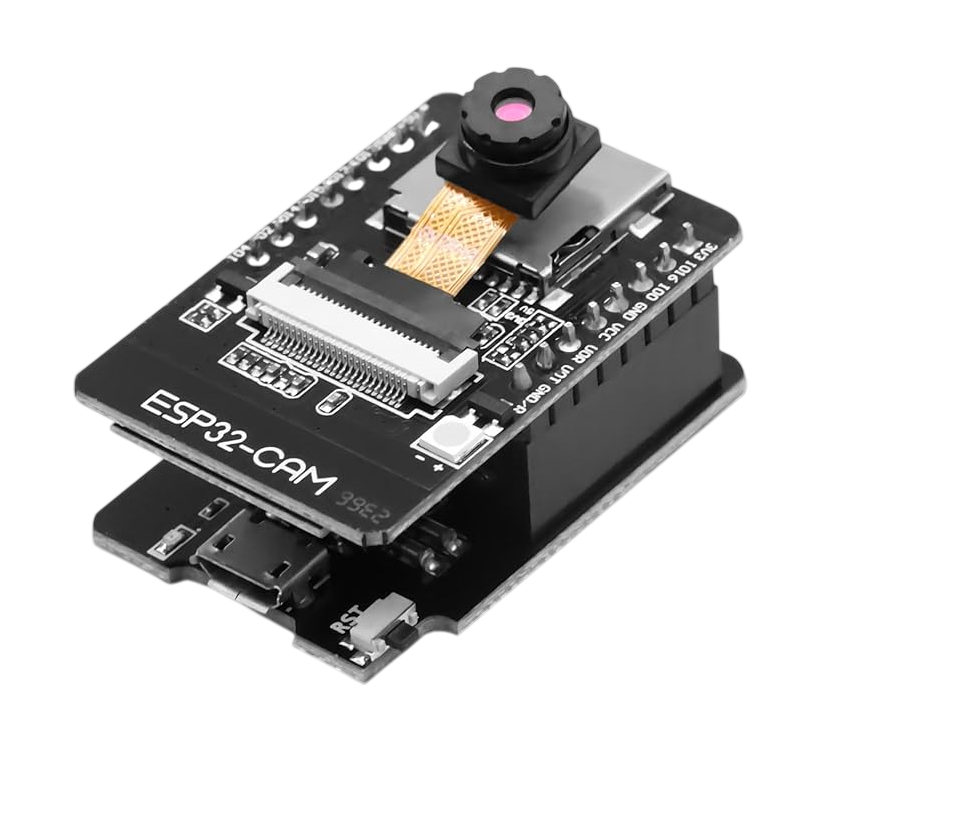
ESP32-CAM WiFi Bluetooth Module with OV2640 Camera
₨ 2,500
[yith_wcwl_add_to_wishlist]
Need some help?
Contact Us
Product Ships in
2-3-business Days
Payment Methods:

OV3660 Esp32-cam Wifi + Bluetooth Camera Module Development Board Esp32 With Camera Module Ov2640 For Arduino
Product Introduction
Are you searching for the best ESP32-CAM WiFi Bluetooth Module with OV2640 Camera in Pakistan? Your search ends here. This compact development board combines powerful processing, wireless connectivity, and a high-quality camera in one tiny package. We offer the premium ESP32-CAM WiFi Bluetooth Module with OV2640 Camera at an unbeatable price. This module opens up endless possibilities for your IoT and camera projects.
The ESP32-CAM WiFi Bluetooth Module with OV2640 Camera features the powerful ESP32 dual-core processor running at up to 240MHz . This delivers exceptional processing power for demanding applications. The ESP32-CAM WiFi Bluetooth Module with OV2640 Camera includes the OV2640 2-megapixel camera sensor that captures high-resolution images. The built-in 4MB PSRAM and 32Mbit flash memory provide ample storage for your projects .
Why do students, professionals, and businesses across Pakistan choose the ESP32-CAM WiFi Bluetooth Module with OV2640 Camera? The answer lies in its incredible versatility and value. The ESP32-CAM WiFi Bluetooth Module with OV2640 Camera supports JPEG, BMP, and grayscale image output formats. It streams video directly to your smartphone or computer via WiFi. The ESP32-CAM WiFi Bluetooth Module with OV2640 Camera also supports Bluetooth 4.2 for additional connectivity options .
The ESP32-CAM WiFi Bluetooth Module with OV2640 Camera offers a built-in microSD card slot for storing captured images and videos . This feature makes the ESP32-CAM WiFi Bluetooth Module with OV2640 Camera perfect for surveillance and data logging applications. The module measures only 27mm x 40.5mm, fitting easily into any project . The onboard PCB antenna ensures reliable wireless communication.
We understand the needs of the Pakistani market. We stock the ESP32-CAM WiFi Bluetooth Module with OV2640 Camera in large quantities. Each unit undergoes quality testing before shipping. The ESP32-CAM WiFi Bluetooth Module with OV2640 Camera operates on 5V power and supports multiple sleep modes for low-power applications. This makes it ideal for battery-powered projects.
Check the ESP32-CAM WiFi Bluetooth Module with OV2640 Camera today. We deliver across Lahore, Karachi, Islamabad, and all of Pakistan. Add wireless camera capabilities to your projects. Order the ESP32-CAM WiFi Bluetooth Module with OV2640 Camera now.
2️⃣ Key Features
-
Process images efficiently with the 240MHz dual-core ESP32 processor
-
Capture high-quality photos with the 2-megapixel OV2640 camera sensor
-
Stream live video directly to your smartphone or computer over WiFi
-
Store images and data using the built-in microSD card slot
-
Connect wirelessly with both WiFi (802.11 b/g/n) and Bluetooth 4.2
-
Access 520KB of internal SRAM and 4MB of external PSRAM
-
Program easily using the Arduino IDE with extensive library support
-
Save power with deep sleep mode consuming as little as 6mA
-
Power the module with a simple 5V DC supply
-
Mount the compact 27x40.5mm board into tight spaces
-
Interface with sensors using UART, SPI, I2C, PWM, and ADC pins
-
Upload images quickly with WiFi picture upload support
-
Use the built-in flash for low-light photography
-
Support multiple image formats including JPEG, BMP, and grayscale
-
Operate in STA, AP, or STA+AP modes for flexible networking
-
Update firmware over-the-air with remote upgrade support
-
Connect easily with the 9 available IO pins
-
Implement Smart Config and AirKiss for one-click network setup
-
Enjoy reliable performance with the FreeRTOS operating system
-
Develop projects with embedded LwIP TCP/IP stack
3️⃣ Advanced Features
-
Implement AI-powered object detection using the 240MHz dual-core processor
-
Develop smart surveillance systems with real-time motion detection
-
Create wireless spy robots with remote control capabilities
-
Build facial recognition systems for security applications
-
Stream video to cloud platforms like AWS and Firebase
-
Automate image capture and upload for monitoring applications
-
Design QR code and barcode scanning systems
-
Implement time-lapse photography with microSD storage
-
Create remote environmental monitoring stations
-
Develop wireless identification systems for inventory management
-
Build home automation systems with camera feedback
-
Design drone and UAV camera systems
-
Implement factory automation and quality control monitoring
-
Create smart doorbell and entry systems
-
Develop traffic monitoring and counting systems
-
Design agricultural monitoring for crops and livestock
-
Build parking assistance and vehicle detection systems
-
Implement healthcare monitoring with camera capture
-
Create smart retail analytics systems
-
Develop educational tools for computer vision learning
4️⃣ Frequently Asked Questions
Q1: What is the ESP32-CAM WiFi Bluetooth Module with OV2640 Camera?
Answer: This module combines an ESP32 microcontroller with a 2MP OV2640 camera. It supports WiFi and Bluetooth connectivity for wireless image capture and streaming applications .
Q2: What voltage does the ESP32-CAM WiFi Bluetooth Module with OV2640 Camera need?
Answer: The module requires 5V DC power supply. Ensure your power source provides at least 5V 2A for stable operation, especially when using the flash .
Q3: Does this module support video streaming?
Answer: Yes, the ESP32-CAM WiFi Bluetooth Module with OV2640 Camera streams live video over WiFi. You can view the feed on your smartphone, PC, or any web browser .
Q4: Can I store images on the ESP32-CAM?
Answer: Yes, the module includes a microSD card slot that supports TF cards up to 4GB. This lets you store captured images and videos for later retrieval .
Q5: Is the ESP32-CAM compatible with Arduino IDE?
Answer: Yes, you can program the ESP32-CAM using Arduino IDE. Install the ESP32 board manager and use the many available libraries .
Q6: What is the ESP32-CAM's power consumption?
Answer: The module consumes approximately 180mA at 5V during normal operation. In deep sleep mode, it uses as little as 6mA for battery-powered projects .
Q7: Can I use the ESP32-CAM with a battery?
Answer: Yes, the module works with battery power. The low deep sleep current of 6mA makes it suitable for portable applications.
Q8: Where can I buy the ESP32-CAM WiFi Bluetooth Module with OV2640 Camera in Pakistan?
Answer: Purchase from our online store with delivery across Pakistan. We serve Lahore, Karachi, Islamabad, and all major cities.
Q9: How do I upload code to the ESP32-CAM?
Answer: Connect the module using a USB-to-serial adapter. Connect GPIO0 to GND to enter programming mode. Then upload your code via the serial pins .
Q10: What applications is the ESP32-CAM good for?
Answer: The module excels in IoT applications including home security, smart devices, industrial wireless control, QR identification, and wireless monitoring systems .
5️⃣ Where It Can Be Used
-
Home Security: Create wireless surveillance cameras with motion detection
-
Spy Robots: Build remote-controlled robots with live video streaming
-
Smart Doorbells: Develop video doorbells with smartphone notifications
-
Inventory Management: Implement QR code scanning for warehouse tracking
-
Environmental Monitoring: Capture images of agricultural fields and crops
-
Traffic Monitoring: Count vehicles and analyze traffic patterns
-
Industrial Automation: Monitor production lines and quality control
-
Drone Projects: Add camera capability to UAV and drone applications
-
Educational Projects: Teach computer vision and IoT concepts
-
Smart Retail: Implement customer counting and analytics systems
6️⃣ How to Use
Setup Instructions
Using the ESP32-CAM WiFi Bluetooth Module with OV2640 Camera requires a few simple steps. Start by installing the ESP32 board manager in your Arduino IDE. Go to File > Preferences and add the ESP32 board URL. Then install the ESP32 boards through the Board Manager .
Connect your ESP32-CAM to a USB-to-serial adapter. Connect the adapter's TX to the module's RX, RX to TX, and 5V and GND to the module's power pins. To upload code, connect GPIO0 to GND to put the module in programming mode . Then press the reset button.
Open the Arduino IDE and select the ESP32-CAM board. Choose the correct COM port. Load the example WiFi camera sketch from the Examples menu. Modify the code with your WiFi credentials. Click upload and wait for the code to transfer.
After uploading, remove the GPIO0 connection and press reset. The module will now host a WiFi access point. Connect your phone or PC to its network. Open a web browser and enter the module's IP address. You will see the live camera feed .
Safety Tips
Always ensure your power supply provides at least 5V 2A. Inadequate power causes unstable video and image issues . Do not exceed 5.25V input voltage. Avoid touching the camera lens to prevent smudging. Protect the module from static discharge during handling.
Maintenance Guidance
Clean the camera lens gently with a microfiber cloth. Keep the module in a dry environment. Check connections regularly for secure fit. Update firmware when new versions become available. Store in an anti-static bag when not in use.
7️⃣ Advantages
-
Integrated Camera: OV2640 camera included on the board
-
Dual Connectivity: Both WiFi and Bluetooth in one module
-
Powerful Processing: 240MHz dual-core ESP32 processor
-
Compact Size: Small 27x40.5mm footprint fits any project
-
Low Power: Deep sleep mode at 6mA for battery projects
-
Flexible Storage: Supports microSD cards for image storage
-
Easy Programming: Arduino IDE compatible with many libraries
-
Cost-Effective: Affordable solution for camera projects
-
Versatile: Suitable for surveillance, robots, and IoT applications
-
Image Quality: Supports JPEG output for efficient storage
8️⃣ Disadvantages
-
Power Sensitive: Requires stable 5V 2A supply
-
Complex Setup: Requires USB-to-serial adapter for programming
-
IO Pin Conflict: Several pins used internally for camera and SD card
-
Limited Range: PCB antenna range less than external antenna options
-
No Built-in Programmer: Needs external programming hardware
-
GPIO0 Requirement: Must connect GPIO0 to GND for programming
-
Heat Generation: May warm up during continuous operation
-
Streaming Limitations: Lower frame rates at higher resolutions
-
No Real-Time Clock: Requires external RTC for time-stamping
-
Beginner Unfriendly: Some technical knowledge required for setup
9️⃣ City-Wise Sales Coverage in Punjab
We proudly deliver the ESP32-CAM WiFi Bluetooth Module with OV2640 Camera to customers across Punjab. This powerful camera module is available in all major cities including Lahore, Faisalabad, Rawalpindi, Multan, Gujranwala, Sialkot, Bahawalpur, Sargodha, Rahim Yar Khan, Sheikhupura, Jhang, Dera Ghazi Khan, Gujrat, Okara, Kasur, Sahiwal, Khanewal, Chiniot, Pakpattan, and Vehari. Get fast delivery and genuine quality in your city today. Order now and add wireless camera capabilities to your projects.
Buy ESP32-CAM WiFi Bluetooth Module with OV2640 Camera in Pakistan Shop genuine ESP32-CAM WiFi Bluetooth Module with OV2640 Camera in Pakistan. Powerful dual-core processor with 2MP camera for IoT projects. Available in Lahore & all cities. ESP32-CAM Pakistan, ESP32 camera module, OV2640 camera Pakistan, WiFi Bluetooth module, ESP32-CAM price, Arduino camera module, IoT camera Pakistan, ESP32 development board, wireless camera module, ESP32-CAM Lahore, surveillance module Pakistan, ESP32 with camera, Bluetooth camera module, ESP32 price Pakistan, camera module for Arduino