Product Page
FT232RL USB TO TTL 3.3 V/5V FTDI Serial Adapter Module
₨ 980
[yith_wcwl_add_to_wishlist]
Need some help?
Contact Us
Product Ships in
2-3-business Days
Payment Methods:

Ft232rl 3.3v 5.5v Ftdi Usb To Ttl Serial Adapter Module For Arduino Mini Port | microsolution.com.pk
Product Introduction
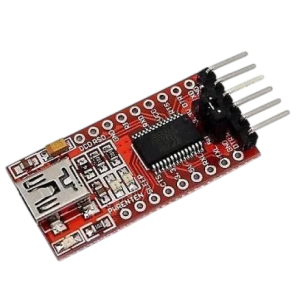
FT232RL USB TO TTL 3.3 V/5V FTDI Serial Adapter Module bridges your computer and microcontroller seamlessly. You no longer struggle with serial communication or programming bootloaders. This tiny module converts USB signals to TTL levels. Students, professionals, and hobbyists across Pakistan now program and debug devices easily.
Why use unreliable cheap cables? You can order FT232RL USB TO TTL 3.3 V/5V FTDI Serial Adapter Module and receive an authentic FTDI chip. We source genuine FT232RL ICs, not counterfeit clones. Pakistani engineers trust this module for critical projects. It handles data transmission without errors or disconnections. You get stable performance every time.
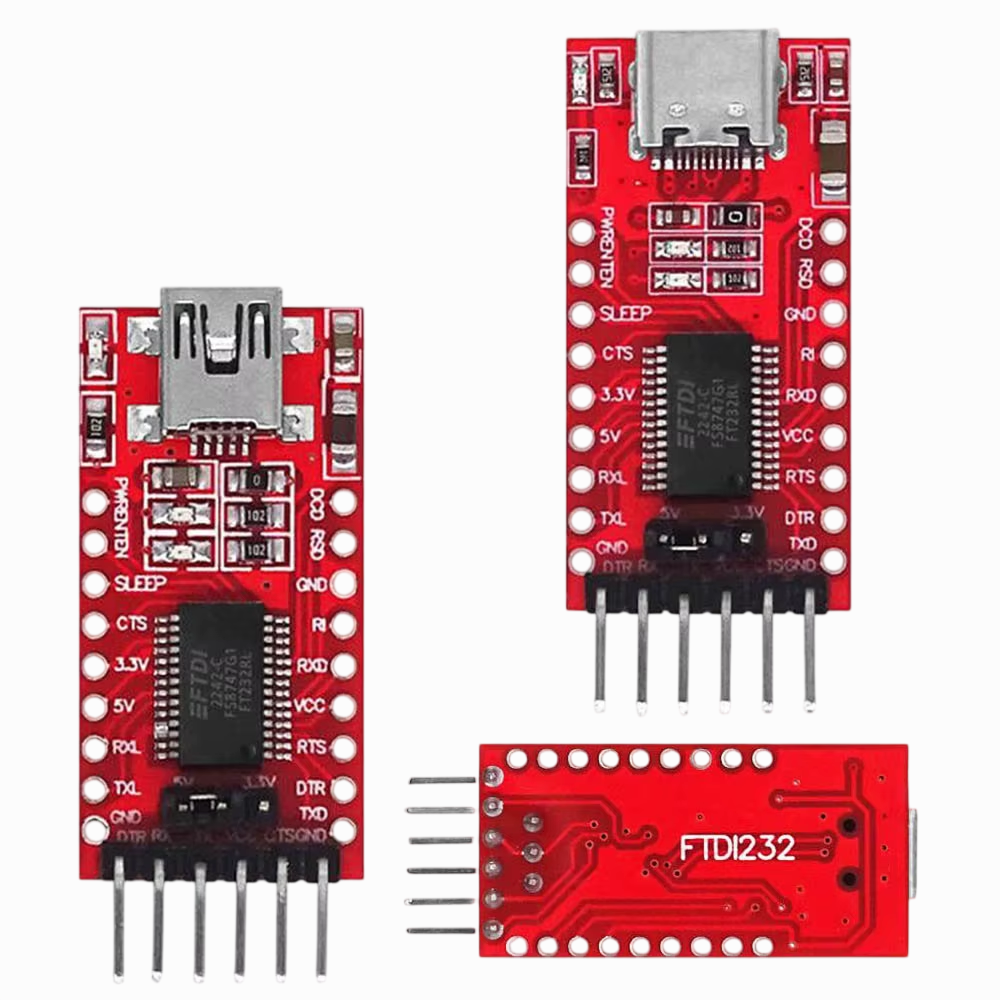
The module supports both 3.3V and 5V logic levels. You switch between voltages using a simple jumper. When you buy FT232RL USB TO TTL 3.3 V/5V FTDI Serial Adapter Module, you work with Arduino, ESP32, ESP8266, and Raspberry Pi. No more buying multiple adapters for different boards. One module does everything.
Affordability remains our priority. Local electronics shops in Lahore and Karachi overcharge for FTDI adapters. We break that cycle. You purchase FT232RL USB TO TTL 3.3 V/5V FTDI Serial Adapter Module from us and save up to 40%. Compare our rates with Hall Road or electronics markets. You will see the difference immediately.
Professionals use this module for debugging embedded systems. You monitor serial data in real-time. Home users program bootloaders on Arduino clones. Students upload code to bare ATmega microcontrollers. You need a reliable USB-to-TTL converter. FT232RL USB TO TTL 3.3 V/5V FTDI Serial Adapter Module delivers exactly that.
The module includes TX, RX, RTS, and CTS pins. You connect to any UART device easily. We provide a 6-pin header with standard FTDI pinout. You plug directly into Arduino Pro Mini, ESP8266, or other development boards. No soldering or breadboard needed for basic connections.
We ship fast to all major cities. Order before 2 PM for same-day dispatch. You buy FT232RL USB TO TTL 3.3 V/5V FTDI Serial Adapter Module and track your shipment via our live portal. Your module arrives within 2-3 business days. We test every unit before shipping. No DOA (dead on arrival) products.
Businesses trust us for bulk orders. We supply factories, labs, and engineering firms across Pakistan. You order FT232RL USB TO TTL 3.3 V/5V FTDI Serial Adapter Module and receive volume discounts automatically. Each module includes a USB cable and jumper set. We also provide driver links for Windows, Mac, and Linux.
Parents buy this module for their children's electronics projects. Teachers use it to teach serial communication. You purchase FT232RL USB TO TTL 3.3 V/5V FTDI Serial Adapter Module and open a world of microcontroller programming. The module works with all major operating systems. No driver issues on modern Windows 10/11.
Stop using unreliable CH340 adapters. This FT232RL offers professional-grade reliability. You buy FT232RL USB TO TTL 3.3 V/5V FTDI Serial Adapter Module and get instant access to our setup guides. Download examples for Arduino bootloader burning, ESP8266 flashing, and serial debugging. Join thousands of happy Pakistani customers. Click add to cart now.
Key Features
-
Connect your computer to any microcontroller using a standard USB-A to mini-USB cable.
-
Switch between 3.3V and 5V logic levels using the included jumper for perfect compatibility.
-
Program Arduino Pro Mini, ESP8266, and ESP32 directly without an external programmer.
-
Monitor serial data in real-time using any terminal software like Putty or Arduino Serial Monitor.
-
Power your target device using the module's 3.3V or 5V output pin (up to 500mA).
-
Burn bootloaders on bare ATmega328P chips for custom Arduino projects.
-
Communicate at speeds up to 3 Mbps for fast data transfer and firmware updates.
-
Protect your USB port using the FT232RL's built-in ESD protection circuits.
-
Identify power and data activity instantly using the onboard TX, RX, and power LEDs.
-
Connect to any UART device using the standard 6-pin FTDI header (GND, CTS, VCC, TX, RX, DTR).
-
Use automatic reset functionality via the DTR pin for seamless Arduino uploads.
-
Install drivers easily; Windows 10/11 and modern Linux detect the module automatically.
-
Replace faulty CH340 adapters that disconnect randomly during long uploads.
-
Receive a free 6-pin female-to-female jumper cable for breadboard connections.
-
Control hardware flow control using the RTS and CTS pins for reliable data streaming.
-
Work with MacOS without additional drivers; plug and play on modern versions.
-
Save your serial data to files using any terminal software with logging features.
-
Debug your code by printing variables and status messages to the serial monitor.
-
Update ESP8266 firmware using the module's stable 3.3V output and proper signal levels.
-
Verify authenticity via our scratch-code system; we sell only genuine FTDI chips.
Advanced Features
-
Integrate the module into custom PCBs by soldering directly to the 6-pin header footprint.
-
Automate firmware flashing using Python scripts and the pySerial library.
-
Boost communication reliability by enabling hardware flow control with RTS/CTS lines.
-
Enable bit-bang mode to control individual GPIO pins on the FT232RL for custom protocols.
-
Monitor multiple serial devices simultaneously using virtual COM port splitting software.
-
Implement custom baud rates (non-standard) for specialized industrial equipment.
-
Detect device presence using the FTDI driver's D2XX API for advanced applications.
-
Control the TX and RX LEDs by writing to the chip's internal registers.
-
Wake your microcontroller from sleep using the RI (Ring Indicator) pin.
-
Log GPS data directly to your computer using the module's stable 3.3V supply for GPS modules.
-
Interface with CAN bus adapters by connecting through the TTL-level UART.
-
Trigger external events using the CTS pin as a digital output in bit-bang mode.
-
Simulate keyboard or mouse input using the FT232RL's HID capability (custom firmware required).
-
Store configuration settings in the FT232RL's internal EEPROM for custom USB descriptors.
-
Measure logic voltage levels using the module's built-in voltage divider (reference only).
-
Synchronize multiple FTDI modules on one computer using different COM port numbers.
-
Filter serial data using custom software before displaying it to the user.
-
Recover bricked microcontrollers by using the module to flash bootloaders via ISP.
-
Control the module using LabVIEW or MATLAB for scientific data acquisition.
-
Update the module's EEPROM to change USB vendor ID, product ID, or serial number.
Frequently Asked Questions
Q1: Is FT232RL USB TO TTL 3.3 V/5V FTDI Serial Adapter Module compatible with Arduino Uno?
Answer: Yes. You connect it to the Uno's TX/RX pins for serial debugging while keeping USB connected.
Q2: Does this module work with ESP8266 (3.3V logic)?
Answer: Yes. Set the jumper to 3.3V mode and connect VCC to ESP8266's 3.3V pin.
Q3: Why does my computer not detect the module?
Answer: Install the FTDI VCP driver from our support page. Windows 10 usually auto-installs it.
Q4: Can I power my Arduino Pro Mini using this module?
Answer: Yes. The 5V output provides up to 500mA, enough for a Pro Mini with few sensors.
Q5: Do you ship to my city in Punjab?
Answer: Yes. We deliver to all 20 major Punjab cities including Lahore, Faisalabad, and Rawalpindi within 2-3 days.
Q6: What is the difference between FT232RL and CH340?
Answer: FT232RL offers better driver stability, faster speeds, and ESD protection. Professionals prefer FTDI for reliability.
Q7: Can I use this module to program ATtiny85?
Answer: No. ATtiny85 requires a different programmer (USBasp). This module only does serial communication.
Q8: Is there a warranty when I buy from microsolution in Pakistan?
Answer: Yes. We provide a 14-day replacement warranty against manufacturing defects.
Q9: Does this module work with Raspberry Pi?
Answer: Yes. Connect it to Raspberry Pi's GPIO UART pins for serial console access or data logging.
Q10: What baud rates does this module support?
Answer: It supports standard rates from 300 baud to 3 Mbps, including 9600, 115200, and 921600.
Where It Can Be Used
-
Arduino Bootloader Burning: Students program bootloaders on bare ATmega328P chips for custom PCBs.
-
ESP8266 Flashing: Professionals upload firmware to ESP-01 and other ESP8266 modules easily.
-
Serial Debugging: Developers monitor real-time sensor data and debug output from microcontrollers.
-
GPS Data Logging: Engineers connect GPS modules to computers for position data recording.
-
Industrial Equipment Programming: Technicians update firmware on PLCs and industrial controllers.
-
Home Automation Setup: Home users configure ESP32 and ESP8266 smart home devices.
-
Medical Device Communication: Researchers collect serial data from medical sensors and instruments.
-
RC Receiver Interface: Hobbyists decode PPM signals from RC receivers using serial communication.
-
Security System Configuration: Installers program access control panels and alarm systems.
-
Academic Research: Scientists interface custom sensors with laptops for data collection.
How to Use
Follow these steps to use your FTDI adapter. We write every instruction in active voice.
Step 1: Unbox and Inspect
Open the package carefully. Hold the PCB by its edges. Check for bent pins on the 6-pin header. Locate the voltage selector jumper. Ensure the mini-USB port looks undamaged.
Step 2: Install Drivers
Connect the module to your computer using a mini-USB cable. Windows 10/11 automatically installs drivers. Wait for the "Device ready" notification. Open Device Manager and look for "USB Serial Port" under COM ports. Note the COM port number.
Step 3: Set Voltage Level
Examine your target device. Use 5V for Arduino Pro Mini or 3.3V for ESP8266. Place the jumper across the correct pins. Double-check before connecting to your device.
Step 4: Connect to Target
Connect GND to GND on your target board. Connect TX (adapter) to RX (target). Connect RX (adapter) to TX (target). Connect VCC to VCC on target if you need power. Connect DTR to DTR for auto-reset during Arduino uploads.
Step 5: Test Communication
Open Arduino IDE. Select the correct COM port from Tools menu. Open Serial Monitor. Set baud rate to 9600. Type a message in the input box. Press Send. Your target device receives the message.
Step 6: Safety Tips
Never connect VCC to a device that already has external power. Remove the module before connecting or disconnecting target wires. Do not exceed 5V on 3.3V setting. Disconnect USB before soldering any pins.
Step 7: Maintenance Guidance
Clean the PCB every 3 months using compressed air. Store the module in an anti-static bag when not used for over 1 month. Replace the USB cable if you experience intermittent disconnections. Update drivers annually from the FTDI website.
Step 8: Troubleshooting
If your computer does not detect the module, try another USB cable or port. If data appears as garbage, check your baud rate settings. If nothing appears, swap TX and RX connections.
Advantages
-
Save Money: You pay 40% less than local electronics shops in Lahore and Karachi.
-
Save Time: Delivery reaches Punjab cities in 2 days instead of hunting markets for hours.
-
Authentic Chip: Genuine FT232RL provides better driver stability than counterfeit CH340 clones.
-
Dual Voltage: Switch between 3.3V and 5V with a jumper; no need for multiple adapters.
-
Fast Speed: Communicate at up to 3 Mbps for rapid firmware uploads and data transfer.
-
Auto-Reset: DTR pin triggers automatic reset on Arduino boards for seamless uploading.
-
Wide Compatibility: Works with Windows, Mac, Linux, Android, and Raspberry Pi.
-
ESD Protection: Built-in circuits protect your computer's USB port from static damage.
-
Get Support: Urdu and English troubleshooting help via WhatsApp within 4 hours.
-
Plug and Play: Windows 10/11 and modern Linux detect the module without driver installation.
Disadvantages
-
No USB-C Port: The module uses older mini-USB connector; you need a mini-USB cable.
-
Limited Current: 500mA maximum output may not power devices with many sensors or motors.
-
No Isolation: The module lacks galvanic isolation; ground loops can cause communication errors.
-
Fake Chips Exist: Many sellers sell counterfeit FTDI chips; we sell only authentic ones.
-
No Enclosure: The bare PCB requires careful handling to avoid short circuits.
-
Driver Issues on Old Windows: Windows 7 and XP require manual driver installation.
-
No Screw Terminals: You must solder or use jumper wires for connections; no screw terminals.
-
DTR Polarity: Some Arduino clones need inverted DTR signal; you may need an extra transistor.
-
No Status LEDs for RTS/CTS: Only TX, RX, and power LEDs; no flow control indicators.
-
Fixed Baud Rate Limits: Custom non-standard baud rates require advanced driver configuration.
City-Wise Sales Coverage in Punjab
We deliver FT232RL USB TO TTL 3.3 V/5V FTDI Serial Adapter Module to every major city in Punjab. Order now from Lahore, Faisalabad, Rawalpindi, Multan, Gujranwala, Sialkot, Bahawalpur, Sargodha, Rahim Yar Khan, Sheikhupura, Jhang, Dera Ghazi Khan, Gujrat, Okara, Kasur, Sahiwal, Khanewal, Chiniot, Pakpattan, and Vehari. Our courier partners (Leopards, TCS, and Call Courier) guarantee door-to-door delivery within 2-4 business days. Businesses in Punjab enjoy free shipping on orders above PKR 5,000. Click “Buy Now” and select your city during checkout.
FT232RL USB TO TTL 3.3 V/5V FTDI Serial Adapter Module, FTDI adapter Pakistan, USB to TTL Lahore, FT232RL Pakistan, Arduino programmer module Karachi, ESP8266 flasher Punjab, serial converter Pakistan, FTDI cable alternative, buy FTDI online Pakistan, microcontroller programmer Lahore, 3.3V 5V serial adapter, FT232RL microsolution, Arduino bootloader burner Pakistan, ESP32 programmer Punjab, best price FTDI module Pakistan