Product Page
IIC I2C 1604 16×4 LCD Display Module for Arduino – Best Price in microsolution.com.pk
₨ 2,100
[yith_wcwl_add_to_wishlist]
Need some help?
Contact Us
Product Ships in
2-3-business Days
Payment Methods:

Iic I2c Twi 164 1604 16x4 Lcd Screen Module Character Series With Backlight For Arduino in Pakistan
Product Introduction
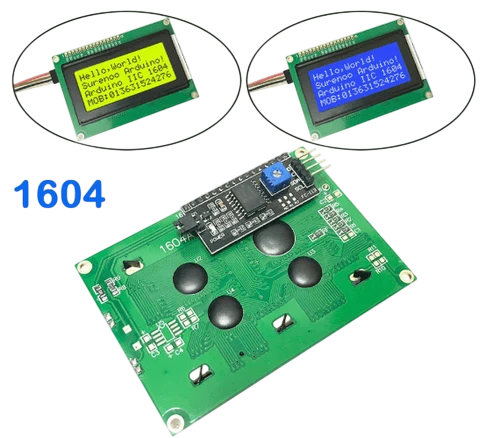
Are you running out of pins on your Arduino board? Many project builders in Pakistan face this exact challenge. You connect several sensors and suddenly realize you have no pins left for a display. The IIC I2C TWI 164 1604 16x4 LCD Screen Module Character Series With Backlight For Arduino solves this problem elegantly.
This remarkable display module uses only 2 wires to show your data. The IIC I2C TWI 164 1604 16x4 LCD Screen Module Character Series With Backlight For Arduino connects through the I2C protocol, freeing up your precious GPIO pins for other components. When you use the IIC I2C TWI 164 1604 16x4 LCD Screen Module Character Series With Backlight For Arduino, you can still connect sensors, motors, and SD cards without sacrificing display functionality.
The IIC I2C TWI 164 1604 16x4 LCD Screen Module Character Series With Backlight For Arduino displays 16 characters across 4 lines, giving you ample space for data visualization. This 16x4 character LCD module provides rich command settings including clear display, cursor return, display on/off, cursor on/off, character flashing, and display shifting . The IIC I2C TWI 164 1604 16x4 LCD Screen Module Character Series With Backlight For Arduino offers the perfect balance of information density and readability.
We understand Pakistani students, professionals, and hobbyists need affordable yet reliable components. The IIC I2C TWI 164 1604 16x4 LCD Screen Module Character Series With Backlight For Arduino delivers exceptional value with its built-in backlight and I2C interface. The default I2C address is 0x27, and the module operates at 5V .
Don't let pin limitations hold back your projects. Order the IIC I2C TWI 164 1604 16x4 LCD Screen Module Character Series With Backlight For Arduino today and display your data with just 2 wires.
2️⃣ Key Features
-
Save Precious Pins: Connect the display using only 2 I2C wires, leaving other pins for sensors .
-
Display More Information: Show 16 characters on each of 4 lines for comprehensive data output .
-
Illuminate Your Projects: Read the screen clearly with the built-in LED backlight .
-
Power with 5V: Run the module directly from your Arduino's 5V supply .
-
Connect Easily: Use standard Dupont wires or IIC dedicated cables for quick setup .
-
Adjust Contrast Easily: Fine-tune display clarity using the onboard potentiometer .
-
Control Backlight: Turn the backlight on or off through software commands .
-
Use Default Address: Start immediately with the standard 0x27 I2C address .
-
Access Rich Commands: Clear display, move cursor, and flash characters programmatically .
-
Display Multiple Data Types: Show numbers, letters, and symbols on the same screen.
-
Compatible with HD44780: Use standard libraries for this industry-standard controller .
-
Save Development Time: Use pre-written Arduino libraries and example code .
-
Work with Multiple Boards: Use with Arduino, Raspberry Pi, and other microcontroller platforms .
-
Monitor in Real-Time: Display sensor readings and system status live.
-
Get Compact Design: Fit the module easily into your project enclosure.
-
Reduce Wiring Complexity: Eliminate messy parallel wiring with the I2C interface.
-
Enjoy Reliable Operation: Benefit from stable performance in various conditions.
-
Connect Multiple Displays: Use up to 8 modules on a single I2C bus with address changes .
-
Get Great Value: Access professional display functionality at an affordable price in Pakistan.
-
Start Immediately: Use the included IIC interface for instant connection .
3️⃣ Advanced Features
-
I2C Protocol Integration: Communicate with the display through the efficient I2C serial protocol using only SDA and SCL lines .
-
PCF8574 I/O Expander: Use the built-in PCF8574 chip to convert I2C serial data to parallel data for the LCD .
-
Hardware Address Selection: Change the I2C address via 3 solder jumpers to avoid conflicts .
-
Multi-Display Capability: Control up to 8 LCD modules on a single I2C bus .
-
Software Backlight Control: Enable or disable the backlight programmatically for power saving .
-
Precision Contrast Adjustment: Fine-tune display clarity with the onboard potentiometer .
-
Command-Based Control: Send clear display, cursor movement, and line addressing commands .
-
Wide Operating Temperature: Operate reliably from -20℃ to +70℃ .
-
Low Power Consumption: Run efficiently with typical backlight current of 45mA .
-
Industry-Standard Compatibility: Use HD44780-compatible libraries and code .
-
Sunlight Readable Option: Choose variants with excellent visibility in bright conditions .
-
Multiple Backlight Colors: Select from yellow-green, blue, or green backlight options .
-
Flexible Power Supply: Operate at both 3.3V and 5V levels .
-
Rich Font Support: Display English and Japanese characters with built-in fonts .
-
High Contrast Display: Read text clearly with STN-LCD technology .
-
Dual Interface Options: Use either 4-bit or 8-bit parallel mode in addition to I2C .
-
Wide Viewing Angle: View the display clearly from multiple angles .
-
Extended Storage Temperature: Store safely from -30℃ to +80℃ .
-
Comprehensive Command Set: Access clear display, cursor return, display shift, and character flash commands .
-
Professional Build Quality: Rely on durable construction for long-term projects .
4️⃣ Frequently Asked Questions (FAQs)
Q1: What is the IIC I2C TWI 164 1604 16x4 LCD Screen Module?
Answer: It is a 16x4 character LCD display module with an I2C interface. It shows 16 characters on 4 lines using only 2 wires to connect to your Arduino .
Q2: How does the I2C interface save pins on my Arduino?
Answer: Standard LCD displays need 6-8 pins. This module uses only 2 pins (SDA and SCL), leaving the rest of your pins for sensors and other components .
Q3: What is the default I2C address of this module?
Answer: The default I2C address is typically 0x27. Some modules may use 0x3F .
Q4: Can I change the I2C address if I have multiple modules?
Answer: Yes, you can change the address using solder jumpers on the I2C adapter board. This allows up to 8 modules on a single I2C bus .
Q5: What voltage does this LCD module use?
Answer: The module operates at 5V and can also work with 3.3V logic in many cases .
Q6: Do I need extra components to use this display?
Answer: No, the module includes the I2C adapter board and backlight. Simply connect SDA, SCL, VCC, and GND to your Arduino .
Q7: Is this module compatible with Arduino Uno?
Answer: Yes, it works perfectly with Arduino Uno, Mega, Nano, and most other Arduino-compatible boards .
Q8: Where can I buy this display in Pakistan?
Answer: This module is available across Pakistan through major electronics retailers in Lahore, Karachi, Islamabad, and other cities .
Q9: Does this display work with Raspberry Pi?
Answer: Yes, the I2C interface makes it compatible with Raspberry Pi and other single-board computers .
Q10: What if my screen doesn't show text correctly?
Answer: Adjust the contrast using the onboard potentiometer. If still not working, verify the I2C address (0x27 or 0x3F) in your code .
5️⃣ Where It Can Be Used
-
Data Monitoring Systems: Display real-time sensor readings like temperature, humidity, and pressure.
-
Robotics Projects: Show robot status, battery level, and sensor feedback.
-
Home Automation: Display room temperature, light status, and device states.
-
Industrial Equipment: Show machine status, production counts, and error codes .
-
Scientific Instruments: Display measurement data and calibration values.
-
Weather Stations: Show temperature, humidity, wind speed, and forecast data.
-
Educational Projects: Teach students about displays and I2C communication.
-
Medical Devices: Display patient monitoring data and system status .
-
Security Systems: Show system status, alarm states, and zone information.
-
Prototyping: Develop and test display interfaces for your product designs.
6️⃣ How to Use
Getting started with the IIC I2C LCD module is straightforward. First, install the LiquidCrystal_I2C library in your Arduino IDE. This library provides the functions to control the display through the I2C interface.
Connect the module to your Arduino using only four wires: VCC to 5V, GND to ground, SDA to the SDA pin (A4 on Uno), and SCL to the SCL pin (A5 on Uno) . The module includes the I2C adapter board, so you don't need any additional components.
Upload the following example code to test your display:
#include <Wire.h>
#include <LiquidCrystal_I2C.h>

LiquidCrystal_I2C lcd(0x27, 16, 4);  // Set address to 0x27 for 16x4 display

void setup() {
  lcd.init();
  lcd.backlight();
  lcd.setCursor(0, 0);
  lcd.print("Hello Pakistan!");
  lcd.setCursor(0, 1);
  lcd.print("16x4 LCD Module");
}
If the screen doesn't show text clearly, adjust the contrast using the potentiometer on the back of the module . If you see blocks instead of text, check the I2C address. Some modules use 0x3F instead of 0x27 .
For safety, disconnect power before making connections. Use the backlight control to save power when not needed. When using multiple modules, change their addresses using solder jumpers to avoid conflicts .
7️⃣ Advantages
-
Pin Saving: Using only 2 wires saves precious GPIO pins for other components .
-
Easy Wiring: Eliminates messy parallel wiring, simplifying your project assembly.
-
Cost-Effective: Combines display and I2C adapter in one affordable package.
-
Versatile Compatibility: Works with Arduino, Raspberry Pi, and other platforms .
-
Rich Display Capability: Shows 16x4 characters for comprehensive data presentation .
-
Built-in Backlight: Read the display clearly in low-light conditions .
-
Adjustable Contrast: Fine-tune readability with the onboard potentiometer .
-
Multi-Device Support: Connect multiple displays on a single I2C bus .
-
Standard Libraries: Use well-documented libraries for quick development .
-
Wide Operating Range: Works reliably across varying temperatures .
8️⃣ Disadvantages
-
I2C Speed Limitations: I2C communication is slower than parallel connection, affecting refresh rates.
-
Address Conflicts: Multiple I2C devices on the same bus can have address conflicts .
-
Default Address Variations: Some modules use 0x27 while others use 0x3F, causing initial confusion .
-
Limited Character Set: Only supports basic English characters and symbols .
-
Requires Library Installation: The I2C driver requires installing external libraries.
-
Contrast Adjustment Needed: You may need manual adjustment for optimal visibility .
-
Backlight Power Consumption: The backlight consumes about 45mA, which can be significant for battery-powered projects .
-
5V Operation: May require level shifting for 3.3V systems .
-
Screen Size: The 16x4 format may be limiting for complex graphical interfaces.
-
Learning Curve: Understanding I2C communication requires some initial learning.
9️⃣ City-Wise Sales Coverage in Punjab
We deliver the IIC I2C TWI 164 1604 16x4 LCD Screen Module Character Series With Backlight For Arduino across all of Punjab, ensuring students, professionals, and hobbyists can access this essential display module. Our complete coverage includes major cities like Lahore, Faisalabad, Rawalpindi, Multan, and Gujranwala . We also serve Sialkot, Bahawalpur, Sargodha, Rahim Yar Khan, Sheikhupura, Jhang, Dera Ghazi Khan, Gujrat, Okara, Kasur, Sahiwal, Khanewal, Chiniot, Pakpattan, and Vehari. No matter where you are in the province, your next display project is just an order away.
IIC I2C 1604 16x4 LCD Display Module for Arduino - Best Price
Buy IIC I2C TWI 164 1604 16x4 LCD Screen Module with Backlight for Arduino in Pakistan. 2-wire connection, saves pins. Fast delivery across Pakistan.
IIC I2C 1604 LCD, 16x4 LCD display, Arduino LCD module, I2C LCD Pakistan, 1604 character LCD, backlight LCD Arduino, 16x4 LCD screen, I2C display module, Arduino display Pakistan, LCD module for Arduino, 1604 LCD price, I2C LCD address 0x27, HD44780 LCD, character LCD display, electronics Pakistan