Product Page
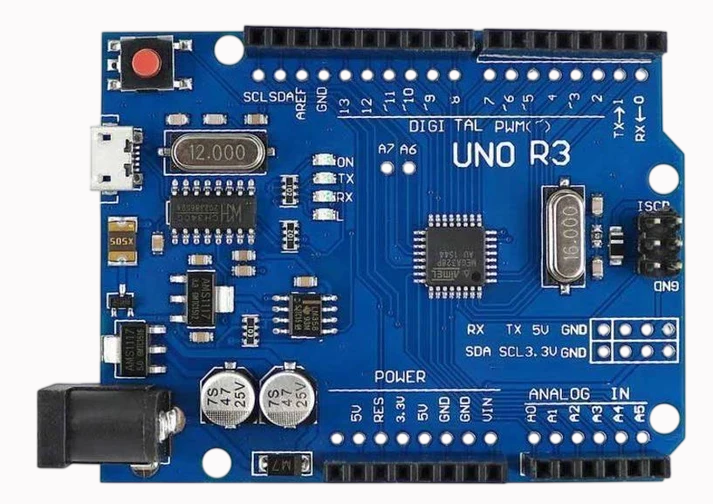
Micro Usb Arduino Uno R3 | microsolution.com.pk
₨ 2,500
[yith_wcwl_add_to_wishlist]
Need some help?
Contact Us
Product Ships in
2-3-business Days
Payment Methods:

Micro USB Arduino Uno R3 | Best Price in Pakistan
Product Introduction
Are you searching for a reliable, powerful, and easy-to-use microcontroller board to start your electronics journey? The Micro Usb Arduino Uno R3 is the perfect choice for students, hobbyists, and professionals alike. This popular development board serves as the heart of thousands of projects worldwide. When you check the Micro Usb Arduino Uno R3 price in Pakistan, you will find that microsolutuion.com.pk offers this incredible board at a highly competitive rate.
For the growing community of makers and innovators in Pakistan, we understand the need for quality components that are also affordable. The Micro Usb Arduino Uno R3 comes equipped with the powerful ATmega328P microcontroller . It provides a robust platform for learning and creating. Whether you are a university student in Lahore, a professional developer in Islamabad, or a hobbyist in Karachi, this board offers the perfect balance of performance and simplicity. We have priced the Micro Usb Arduino Uno R3 to ensure it is accessible to everyone in Pakistan, from beginners taking their first steps to businesses developing prototypes .
Why does this specific version of the Uno R3 stand out? Its most significant upgrade is the modern Micro USB port . This replaces the older USB Type-B connector. The Micro Usb Arduino Uno R3 uses the widely available Micro USB standard, so you can connect it using the same cable you use for your Android phone . This small change makes it much more practical and convenient. No more searching for a rare USB cable when you want to program your board.
The Micro Usb Arduino Uno R3 retains all the classic features that make the Uno famous. It features 14 digital I/O pins, 6 analog inputs, and a 16 MHz crystal oscillator . It is 100% compatible with the standard Arduino Uno R3 program, expansion shields, and the Arduino IDE . This means you can use all the thousands of tutorials, libraries, and shields available online. Discover the best Micro Usb Arduino Uno R3 price at microsolutuion.com.pk.
We deliver this essential component across all of Pakistan. When you buy the Micro Usb Arduino Uno R3, you invest in a board trusted by millions worldwide. Our customers trust us for quality, performance, and the best prices. Get the Micro Usb Arduino Uno R3 now and start creating your next amazing project.
2️⃣ Key Features
-
Power your projects: Use the ATmega328P microcontroller with 32KB of flash memory for your code .
-
Connect easily: Use the modern Micro USB port for programming and power .
-
Use your phone cable: Charge and program your board with any standard Micro USB cable you already own .
-
Run complex programs: Benefit from the 16 MHz clock speed for fast and responsive operation .
-
Connect many components: Use 14 digital I/O pins and 6 analog inputs for your sensors and modules .
-
Control motors: Use 6 PWM outputs for dimming LEDs and controlling servo motors .
-
Use standard shields: Stack any standard Arduino Uno shield on top for instant expansion .
-
Communicate easily: Use the built-in UART, I2C, and SPI communication protocols .
-
Power flexibly: Use the USB port, a battery, or an AC-to-DC adapter (7-12V) .
-
Protect your board: Rely on the onboard 500mA resettable fuse for protection .
-
See status at a glance: Monitor the power, TX, RX, and built-in LED status indicators .
-
Start instantly: Use the board right out of the box with the Arduino IDE .
-
Learn quickly: Access thousands of free online tutorials, examples, and libraries .
-
Build reliable systems: Trust the proven and stable Arduino Uno R3 platform.
-
Connect to 3.3V logic: Some versions include a switch to set the system voltage to 3.3V for compatible modules .
-
Save space: Use a more compact design compared to older boards.
-
Get consistent results: Rely on a stable and well-documented development platform.
-
Make it your own: Use the board for any project, from simple LED blinkers to complex robotics.
-
Be compatible: Use the board with Windows, Mac, and Linux operating systems .
-
Get great value: Enjoy the best price-to-performance ratio for a microcontroller board in Pakistan.
3️⃣ Advanced Features
-
Automate your home: Build a smart home system that controls lights, fans, and appliances.
-
Develop robotics: Create autonomous robots, line followers, or robotic arms.
-
Build IoT devices: Connect sensors and actuators to the internet using WiFi or GSM modules.
-
Log data: Store sensor data on an SD card for later analysis.
-
Use as a programmer: Use the board to program other ATmega microcontrollers .
-
Implement real-time systems: Use the timer and interrupt features for precise timing.
-
Create wearables: Build compact, wearable devices with the board's small form factor.
-
Test new shields: Use the Uno as a testbed for prototyping your own custom shields.
-
Run RTOS: Use a Real-Time Operating System for complex, multi-tasking applications.
-
Develop industrial controls: Prototype industrial automation and control systems.
-
Build scientific instruments: Create data acquisition systems for laboratories.
-
Use with external displays: Connect TFT, OLED, or LCD displays for a rich user interface.
-
Add Bluetooth control: Use a Bluetooth module for wireless control from your phone.
-
Design a simple game: Create a handheld game using buttons and a display.
-
Integrate with cloud services: Send data to and receive commands from cloud platforms like ThingSpeak or Blynk.
-
Build a CNC controller: Use the board to control a small CNC machine or 3D printer (with RAMPS shield).
-
Create a musical instrument: Build a MIDI controller or a simple synthesizer.
-
Use as an oscilloscope: With proper software, use the Uno as a basic oscilloscope.
-
Develop a portable weather station: Create a device that measures and displays temperature, humidity, and pressure.
-
Implement a security system: Build a keypad lock, a motion detector, or a door alarm system.
4️⃣ Frequently Asked Questions
Q1: Where can I find the best Micro Usb Arduino Uno R3 price in Pakistan?
Answer: You can find the most competitive Micro Usb Arduino Uno R3 price directly on our website at microsolutuion.com.pk.
Q2: What is the difference between this and the older USB-B version?
Answer: This board uses a modern Micro USB port instead of the old USB-B connector, making it easier to connect .
Q3: What microcontroller does this board use?
Answer: It uses the popular ATmega328P microcontroller .
Q4: Is this board compatible with standard Arduino shields?
Answer: Yes, it is 100% pin-compatible with all standard Arduino Uno shields .
Q5: What voltage does this board operate on?
Answer: The board operates at 5V but can be powered by 7-12V through the DC jack .
Q6: How do I connect this board to my computer?
Answer: You simply connect it using a standard Micro USB cable .
Q7: What software do I use to program this board?
Answer: You use the official Arduino IDE, which is available for free download .
Q8: Is the product available for delivery across Pakistan?
Answer: Yes, we offer fast and reliable delivery across all major cities in Pakistan.
Q9: What comes in the box?
Answer: The package includes the Micro Usb Arduino Uno R3 board .
Q10: Is this board good for beginners?
Answer: Yes, it is one of the best boards for beginners due to its simplicity and extensive community support .
5️⃣ Where It Can Be Used
-
Educational Projects: Teach electronics, programming, and robotics in schools and universities.
-
Home Automation: Control lights, fans, and appliances with sensors and timers.
-
Robotics: Build autonomous robots, robotic arms, and line-following vehicles.
-
IoT Projects: Create devices that connect to the internet for monitoring and control.
-
Wearable Tech: Develop wearable devices for fitness, health, or fashion.
-
Prototyping: Test and develop new product ideas quickly and easily.
-
Data Logging: Record data from sensors for environmental or scientific monitoring.
-
Interactive Art: Create art installations that respond to sound, light, or touch.
-
DIY CNC and 3D Printing: Use as a controller for small CNC machines or 3D printers (with appropriate shields).
-
Musical Instruments: Build custom MIDI controllers or simple synthesizers.
6️⃣ How to Use
Using the Micro Usb Arduino Uno R3 is a simple and rewarding process, perfect for beginners.
Step 1: Gather Your Materials.
You will need your Micro Usb Arduino Uno R3 board, a standard Micro USB cable, and a computer with an internet connection.
Step 2: Install the Arduino IDE.
Go to the official Arduino website (arduino.cc) and download the Arduino Integrated Development Environment (IDE) for your operating system. Install the software.
Step 3: Connect the Hardware.
Take your Micro USB cable. Plug the Micro USB end into your Micro Usb Arduino Uno R3 board. Plug the other end into a USB port on your computer . The board's power LED should light up.
Step 4: Install the Driver (if needed).
The Micro Usb Arduino Uno R3 uses the CH340G USB-to-Serial chip . Your computer may need a driver. Windows users often need to install a CH340 driver. Mac and Linux systems usually have it built-in. Search online for "CH340 driver" and follow the instructions for your OS.
Step 5: Configure the IDE.
Open the Arduino IDE. Go to Tools > Board and select "Arduino Uno". Go to Tools > Port and select the COM port (Windows) or /dev/cu.usbmodem... (Mac) that appears when you connect the board.
Step 6: Upload Your First Code.
Open the "Blink" example by going to File > Examples > 01.Basics > Blink. This program makes the onboard LED blink. Click the Upload button (the right-pointing arrow). The IDE will compile and upload the code. You will see the TX and RX LEDs on the board flash. After a few seconds, the built-in LED on pin 13 will start blinking.
Safety Tips
-
Avoid shorting any of the pins directly to ground or to each other.
-
Always disconnect power before connecting or disconnecting components to prevent damage.
-
Do not exceed the recommended input voltage of 7-12V on the DC jack .
-
ESD (Electrostatic Discharge) can damage the board. Use anti-static measures.
Maintenance Guidance
The Micro Usb Arduino Uno R3 is a robust board but requires some care. Keep it free from dust and debris. Store it in a dry, cool place. Avoid touching the exposed pins when the board is powered on. If a pin gets bent, carefully straighten it with pliers. Handle the board by its edges to avoid contamination from oils on your skin.
7️⃣ Advantages
-
Superior Performance: Delivers reliable, fast performance with the ATmega328P.
-
Exceptional Affordability: Great value for money compared to other boards .
-
Great Reliability: A proven, stable platform with a massive user base.
-
Very Easy to Use: Simple setup with the Arduino IDE, perfect for beginners .
-
Highly Versatile: Suitable for a huge range of projects.
-
Modern Convenience: Uses a standard Micro USB cable .
-
Saves Time: Quick to set up and program with ready-made libraries.
-
Open-Source Community: Benefit from millions of tutorials, projects, and forums.
-
Expansion Ready: Use the vast ecosystem of Arduino shields.
-
Great Community Support: Benefit from extensive online documentation.
8️⃣ Disadvantages
-
Limited Memory: The 32KB Flash and 2KB SRAM can be limiting for complex projects.
-
Processing Power: The 16MHz 8-bit CPU is not suitable for high-performance or video processing.
-
Power Consumption: It draws more power than some more modern, low-power boards.
-
Requires Drivers: The CH340G chip requires a manual driver install on Windows .
-
Not Original: This version is a clone and not an official Arduino board (though functionally identical).
-
Beginner Setup: The driver installation and IDE configuration can be a barrier for absolute beginners.
-
Analog Voltage: Analog inputs are only 10-bit resolution.
-
Current Limits: The output pins can only source a small amount of current (20-40mA) .
-
No Battery Charger: It lacks a built-in battery charging circuit for portable projects.
-
Fragile Port: Like all Micro USB ports, it is less robust and can be damaged by excessive force.
9️⃣ City-Wise Sales Coverage in Punjab
The Micro Usb Arduino Uno R3 is available for fast shipping across the whole of Punjab. We serve major tech cities including Lahore, Faisalabad, Rawalpindi, Multan, Gujranwala, Sialkot, Bahawalpur, Sargodha, Rahim Yar Khan, Sheikhupura, Jhang, Dera Ghazi Khan, Gujrat, Okara, Kasur, Sahiwal, Khanewal, Chiniot, Pakpattan, and Vehari. Order now, and we will deliver this essential board to your doorstep in just a few days.
-
Micro USB Arduino Uno R3 | Best Price in Pakistan Get the best Micro USB Arduino Uno R3 in Pakistan. The convenient Uno R3 with a Micro USB port. Perfect for students & professionals. Shop now!
-
Micro USB Arduino Uno R3
-
Arduino Uno R3 Micro USB
-
Arduino Uno R3 Price in Pakistan
-
Micro USB Uno
-
CH340 Arduino Uno
-
Arduino Uno SMD
-
Microsolutuion Pakistan
-
Arduino Development Board
-
ATmega328P Board
-
Arduino Starter Kit
-
Buy Arduino Uno in Lahore
-
Arduino Pakistan
-
Uno R3 with Cable
-
Arduino Board for Students
-
Micro USB Development Board
-