Product Page
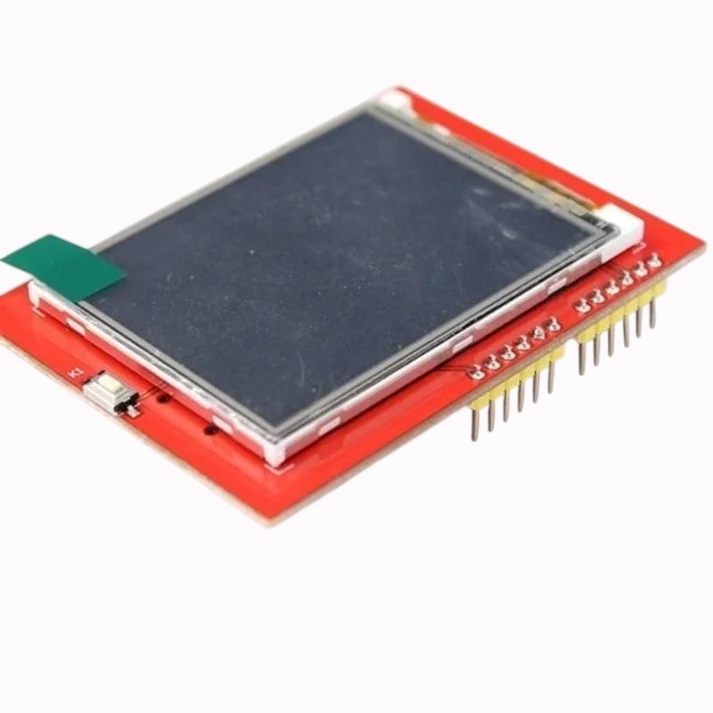

2.4 Inch Tft Lcd Shield For Arduino Esp32 Solar Inverter
Product Introduction
Are you looking to add a stunning visual interface to your Arduino projects? The Arduino Uno 2.4 inch TFT LCD Shield In Pakistan offers the perfect solution. This powerful shield transforms your Arduino Uno into a vibrant display system. It features a bright 2.4-inch color TFT screen with a built-in resistive touchscreen . When you check the Arduino Uno 2.4 inch TFT LCD Shield In Pakistan, you will find that microsolutuion.com.pk offers this high-quality display at a competitive price .
For the growing community of makers, students, and professionals in Pakistan, we understand the need for quality components. The Arduino Uno 2.4 inch TFT LCD Shield In Pakistan delivers an impressive 240x320 pixel resolution . This gives you way more detail than a standard monochrome display. Whether you are a university student in Lahore building a smart home dashboard, a developer in Islamabad creating an interactive menu, or a business prototyping a product, this shield provides the performance you need. We have priced the Arduino Uno 2.4 inch TFT LCD Shield In Pakistan to ensure it is accessible for everyone.
Why choose this display shield? Its straightforward design makes it incredibly easy to use. The Arduino Uno 2.4 inch TFT LCD Shield In Pakistan simply plugs directly onto your Arduino Uno . You do not need any extra wiring. It uses an 8-bit digital interface with standard digital pins 5-13 and analog pins 0-3 . This leaves other important pins like digital pins 2, 3, and analog pins 4 and 5 free for your other sensors and modules . The Arduino Uno 2.4 inch TFT LCD Shield In Pakistan includes a microSD card slot. You can store bitmap images and data on the card and display them directly on the screen . Discover the best Arduino Uno 2.4 inch TFT LCD Shield In Pakistan price at microsolutuion.com.pk.
Building a project with a graphical user interface has never been so simple. You can use the comprehensive libraries available to draw text, shapes, and images with ease . The resistive touchscreen allows you to detect finger presses anywhere on the screen . This creates an interactive experience for your users. Get the Arduino Uno 2.4 inch TFT LCD Shield In Pakistan now and bring a professional look to your projects.
We deliver this product across all of Pakistan. When you buy the Arduino Uno 2.4 inch TFT LCD Shield In Pakistan, you choose a component trusted by thousands of makers worldwide. Our customers trust us for quality, performance, and the best prices. Get the best Arduino Uno 2.4 inch TFT LCD Shield In Pakistan today and start creating amazing visual projects.
2️⃣ Key Features
-
Upgrade your display: Enjoy a vibrant 2.4-inch TFT screen with vivid color contrast .
-
See more details: Get a sharp 240x320 resolution for clear text and images .
-
Add touch functionality: Use the built-in 4-wire resistive touchscreen for interactive controls .
-
Display stunning colors: View your content in 18-bit color with over 262,000 different shades .
-
Plug and play: Simply stack the shield directly onto your Arduino Uno board .
-
Save your pins: Free up digital pins 2, 3, and analog pins 4 and 5 for other components .
-
Read from a microSD: Use the built-in slot to load images and data from a FAT-formatted card .
-
Control the backlight: Adjust the brightness using the 4 white-LED backlights with a digital pin .
-
Use with 5V or 3.3V: The onboard voltage regulator ensures compatibility with both logic levels .
-
Start quickly: Use the numerous libraries and code examples available online .
-
Create interactive menus: Build user-friendly navigation systems for your projects.
-
Display sensor data: Show real-time readings from temperature, humidity, or other sensors.
-
Draw shapes: Use the graphics library to draw circles, rectangles, and lines .
-
Add a reset button: Use the onboard reset switch for easy troubleshooting .
-
Build professional dashboards: Create a polished user interface for your device.
-
Make your project stand out: Move beyond simple LEDs and displays.
-
Touch and control: Use the screen to control your project's functions directly.
-
Protect your work: The shield is durable and built to last.
-
Visualize data: Create beautiful graphs and charts for your data .
-
Be creative: Use the display for gaming, art, or any visual project.
3️⃣ Advanced Features
-
Implement a GUI: Build a custom graphical user interface for your device.
-
Automate your home: Create a smart home dashboard with touch controls for lights and appliances.
-
Develop a portable console: Design a handheld gaming device using the touchscreen.
-
Display images from SD: Load and show high-quality bitmap images from the microSD card .
-
Use with Arduino Mega: The shield works perfectly with Mega as well .
-
Utilize the SPFD5408 driver: Benefit from the built-in video RAM buffer for smooth performance .
-
Create a data logger: Log data to the SD card and display it on the screen simultaneously .
-
Build an IoT interface: Show cloud data and control devices with a touch interface.
-
Develop a test equipment display: Create a portable oscilloscope or signal generator screen.
-
Draw custom widgets: Go beyond simple shapes and create custom interface elements.
-
Store fonts and images: Use the SD card to store custom fonts and graphics .
-
Control with touch: Use touch events to trigger actions in your code.
-
Perfect for prototyping: Test your product's user interface without creating a custom PCB.
-
Build a remote control: Create a touchscreen remote for your home or office.
-
Integrate with sensors: Create a complete sensor monitoring station with a visual output.
-
Use with ESP32: The shield is compatible with other boards like ESP32 as well .
-
Enable screen rotation: Use software to rotate the display orientation as needed .
-
Draw custom images: Use the Adafruit GFX library to create custom graphics .
-
Develop a kiosk interface: Build a simple touch-based information kiosk.
-
Create a secure interface: Use the screen for a PIN entry system for security projects.
4️⃣ Frequently Asked Questions
Q1: Where can I find the best Arduino Uno 2.4 inch TFT LCD Shield In Pakistan?
Answer: You can find the most competitive Arduino Uno 2.4 inch TFT LCD Shield In Pakistan price directly on our website at microsolutuion.com.pk.
Q2: Is this shield compatible with Arduino Uno?
Answer: Yes, the shield is specifically designed for the Arduino Uno form factor .
Q3: What is the resolution of the display?
Answer: The display offers a sharp 240x320 pixel resolution .
Q4: Does this shield have a touch screen?
Answer: Yes, it includes a built-in 4-wire resistive touchscreen for interactive projects .
Q5: How do I connect the shield?
Answer: Simply plug it directly onto your Arduino Uno. No soldering or wiring is required .
Q6: What pins does this shield use?
Answer: It uses digital pins 5-13 and analog pins 0-3, leaving pins 2, 3, A4, and A5 free .
Q7: Does it have a microSD card slot?
Answer: Yes, it has a built-in microSD card slot for storing and displaying images and data .
Q8: Is the product available for delivery across Pakistan?
Answer: Yes, we offer fast and reliable delivery across all major cities in Pakistan.
Q9: What library should I use for this shield?
Answer: You can use the MCUFriend library or libraries compatible with the ILI9341 or SPFD5408 driver .
Q10: What is the Arduino Uno 2.4 inch TFT LCD Shield In Pakistan price at microsolutuion.com.pk?
Answer: We offer this high-quality shield at a very competitive price. Please check our website for the latest price.
5️⃣ Where It Can Be Used
-
Smart Home Dashboards: Create a central touch panel for controlling home automation devices .
-
Sensor Data Monitors: Build a portable display showing real-time data from various sensors .
-
Interactive Menus: Design user-friendly interfaces for your projects .
-
Gaming Consoles: Develop your own retro gaming device with a color screen.
-
Data Loggers: Create a device that logs data to an SD card and displays it on the screen .
-
IoT Interfaces: Build a display for your IoT devices showing cloud data.
-
Educational Projects: Use it to teach students about displays, GUIs, and microcontrollers .
-
Clock and Timers: Create a custom digital clock or countdown timer with a graphical interface.
-
Portable Test Equipment: Build an oscilloscope, signal generator, or multimeter with a display .
-
Product Prototyping: Test the user interface for your product before going to production.
6️⃣ How to Use
Using the Arduino Uno 2.4 inch TFT LCD Shield In Pakistan is a straightforward process, perfect for beginners.
Step 1: Gather Your Materials.
You will need an Arduino Uno board and the TFT LCD Shield. You will also need a micro-USB cable to connect your Arduino to your computer.
Step 2: Connect the Hardware.
This is the simplest step. The Arduino Uno 2.4 inch TFT LCD Shield In Pakistan has a shield form factor. Take your Arduino Uno and carefully align the shield's pins with the Uno's headers. Gently push the shield down until it is firmly seated . Crucially, ensure the bottom of the shield does not make contact with the Arduino's USB port or any other component . You do not need any jumper wires.
Step 3: Prepare the Software.
Open your Arduino IDE. You will need to install the correct library. Go to Sketch > Include Library > Manage Libraries. Search for "MCUFriend" or a library compatible with the SPFD5408 driver . Install the library.
Step 4: Upload the Code.
You can find example sketches in the library. Open one, for example, the graphictest example. This will test your display. In the code, you may need to define the pins for your shield. The standard pins for this shield are:
#define LCD_CS A3
#define LCD_CD A2
#define LCD_WR A1
#define LCD_RD A0
#define LCD_RESET A4
Select your Arduino Uno board and the correct COM port. Then, upload the code .
Step 5: Test the Display.
Once uploaded, the shield should light up and run the test program . If you see a blank screen, check the tft.begin() function is correctly set for your driver.
Safety Tips
-
Power: Ensure your Arduino is powered off before connecting or disconnecting the shield.
-
Handling: Handle the shield by its edges. Avoid touching the screen surface with sharp objects.
-
Alignment: Be very careful when aligning the pins to avoid bending them.
Maintenance Guidance
Keep the TFT screen clean by wiping it with a soft, dry cloth. Avoid exposing the screen to liquids. The microSD slot should also be kept free of dust and debris.
7️⃣ Advantages
-
Superior Performance: Delivers a bright and colorful 240x320 resolution display .
-
Exceptional Affordability: A cost-effective way to add a high-quality screen .
-
Great Reliability: Uses proven technology for consistent operation .
-
Very Easy to Use: Simply plug the shield in, no soldering required .
-
Highly Versatile: Suitable for a wide range of projects .
-
Saves Time: Quick to set up and program with ready-made libraries .
-
Saves Pins: Leaves other pins free for your own components .
-
Touch Interactive: Adds a modern and intuitive interface to your projects .
-
Data Storage: The microSD card slot adds data storage capabilities .
-
Great Community Support: Benefit from extensive online documentation and tutorials.
8️⃣ Disadvantages
-
Resource Intensive: The display and touchscreen can use a significant amount of the Arduino's memory.
-
Fixed Size: It is a 2.4-inch screen, which may not be suitable for all projects .
-
Requires Library: You need to install a specific library to use it .
-
Resistive Touch: Resistive touch is less responsive than capacitive touch.
-
Pin Limitations: While it saves some pins, it uses many of the Uno's digital and analog pins .
-
Power Consumption: The backlit TFT screen draws more power than a basic LCD .
-
Not for High-Speed Video: Not designed for playing videos, more for static images and basic animation.
-
Can Be Bulky: A shield that sits on top of the Arduino adds significant height.
-
Learning Curve: Mastering graphics and touch programming takes some time.
-
Prone to Damage: The screen is fragile and can be scratched or cracked.
9️⃣ City-Wise Sales Coverage in Punjab
The Arduino Uno 2.4 inch TFT LCD Shield In Pakistan is available for fast shipping across the whole of Punjab. We serve major tech cities including Lahore, Faisalabad, Rawalpindi, Multan, Gujranwala, Sialkot, Bahawalpur, Sargodha, Rahim Yar Khan, Sheikhupura, Jhang, Dera Ghazi Khan, Gujrat, Okara, Kasur, Sahiwal, Khanewal, Chiniot, Pakpattan, and Vehari. Order now, and we will deliver this essential shield to your doorstep in just a few days.
Arduino Uno 2.4 TFT LCD Shield | Best Price in Pakistan Get the best Arduino Uno 2.4 inch TFT LCD Shield in Pakistan. Add a vibrant touchscreen to your Arduino for dashboards & games. Shop now!
-
Arduino Uno 2.4 TFT LCD Shield
-
Arduino TFT Shield
-
2.4 Inch Display Shield
-
Arduino Touch Screen
-
TFT LCD Shield Price in Pakistan
-
Arduino Uno Shield
-
Microsolutuion Pakistan
-
Arduino LCD Display
-
TFT Shield with Touch
-
SPFD5408 Display
-
Arduino Screen
-
TFT LCD Module
-
Arduino Projects
-
Interactive Display Shield
-
Buy Arduino Shield in Lahore