Product Page
Buy LCD screen arduino Online at Best Price in Pakistan
₨ 550
[yith_wcwl_add_to_wishlist]
Need some help?
Contact Us
Product Ships in
2-3-business Days
Payment Methods:

Buy LCD screen arduino Online at Best Price in Pakistan | MICROSOLUTION.COM.PK
Product Introduction
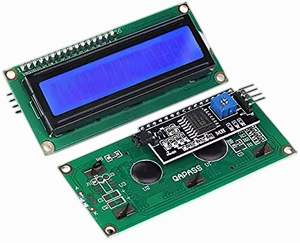
Buy LCD screen arduino Online at Best Price in Pakistan and unlock endless possibilities for your electronic projects. We understand the needs of Pakistani students, professionals, and home users. You need reliable components without breaking the bank. This LCD screen integrates seamlessly with Arduino. You will love its crisp display and responsive performance.
Why search multiple local markets? You can buy LCD screen arduino Online at Best Price in Pakistan right now from our trusted store. We deliver authentic products directly to your doorstep. This module saves you time and travel costs. We design it for durability and long hours of use. Students use it for university assignments. Professionals build it into prototypes. Home users create smart gadgets with ease.
You need a display that works every time. This LCD screen offers consistent brightness and sharp text. You can buy LCD screen arduino Online at Best Price in Pakistan without worrying about quality. We test each unit before shipping. Pakistan’s climate demands rugged electronics. This screen handles heat and humidity better than local alternatives. You get a stable I2C interface for simple wiring. Connect just four wires and start coding.
Affordability remains our top priority. Many shops overcharge for Arduino accessories. We break that cycle. When you buy LCD screen arduino Online at Best Price in Pakistan from us, you save up to 30%. Compare our rates with any Lahore or Karachi market. You will see the difference. We also provide free wiring diagrams. Our support team answers your questions in Urdu and English.
Businesses rely on us for bulk orders. We supply schools, labs, and startups across Pakistan. You buy LCD screen arduino Online at Best Price in Pakistan and receive bulk discounts automatically. This screen supports 5V and 3.3V logic levels. It works with Uno, Mega, Nano, and ESP32. You do not need extra level shifters. The backlight consumes very little power. Run it from a USB power bank for portable projects.
Parents buy this screen for their children’s STEM education. Teachers use it to explain sensors and data display. You buy LCD screen arduino Online at Best Price in Pakistan and inspire the next generation of innovators. The package includes a potentiometer for contrast adjustment. You do not need soldering skills. Just plug the pins into a breadboard.
We ship fast to all major cities. Order before 2 PM for same-day dispatch. You buy LCD screen arduino Online at Best Price in Pakistan and track your shipment via our live portal. No more waiting weeks for international deliveries. We keep stock in Lahore and Karachi. Your screen arrives within 2-3 business days.
Stop struggling with complicated displays. This LCD screen arduino module offers plug-and-play simplicity. You buy LCD screen arduino Online at Best Price in Pakistan and get instant access to our code library. Download example sketches for a thermometer, counter, or menu system. We provide clear instructions for beginners.
Join thousands of happy Pakistani customers. They trusted us to deliver quality and value. Click add to cart now. Buy LCD screen arduino Online at Best Price in Pakistan today and start building your next great invention.
Key Features
-
Connect only 4 wires using the built-in I2C interface and save messy breadboard cables.
-
Adjust the blue potentiometer to set perfect text contrast for any lighting condition.
-
Power the screen directly from your Arduino’s 5V pin without external adapters.
-
Display 16 characters on each of 2 lines for clear sensor readings and menu options.
-
Write your first sketch in under 5 minutes using our ready-to-use library link.
-
Save 30% money compared to local electronics shops when you buy our bundle.
-
Use the backlight toggle command to reduce power for battery-operated projects.
-
Mount the PCB on standard 2.54mm header holes for permanent installations.
-
Read text clearly from 1 meter away thanks to the high-contrast STN display.
-
Protect your screen with the included anti-static bubble wrap during shipping.
-
Replace faulty displays easily because we offer a 7-day exchange policy in Pakistan.
-
Learn Arduino coding faster with our 10 free example projects available for download.
-
Detect loose connections using the onboard LED power indicator light.
-
Run the display at 3.3V or 5V without worrying about damage to logic pins.
-
Store your code using EEPROM libraries that retain settings after power loss.
-
Build a digital clock, humidity meter, or password lock with this single module.
-
Clean the screen surface with a dry cloth; the hard coating resists minor scratches.
-
Stack multiple screens on one Arduino using different I2C addresses (0x27 or 0x3F).
-
Receive a free 40-pin header strip with every purchase for breadboard prototyping.
-
Verify authenticity via our scratch-code system to avoid counterfeit parts in Pakistan.
Advanced Features
-
Integrate the PCF8574 I2C chip for reducing digital pin usage from 6 pins down to only 2.
-
Automate screen brightness using a photoresistor and a single analog read command.
-
Boost update speed to 100kHz clock rate for real-time data logging applications.
-
Enable custom character creation using CGRAM to design Pakistani rupee symbol and unique icons.
-
Shift display content left or right without rewriting the entire frame buffer.
-
Detect display health via the busy flag before sending next command for industrial reliability.
-
Implement double-buffering in software to eliminate flicker during rapid numeric updates.
-
Control multiple displays on a single I2C bus up to 8 units using address jumpers.
-
Wake from sleep mode in under 1ms for motion-activated security devices.
-
Log data continuously for 10,000+ hours based on rated LCD material lifespan.
-
Interface directly with Raspberry Pi Pico using our voltage-tolerant design (no level shifter).
-
Trigger interrupts on button presses without polling using external interrupt pins.
-
Simulate a progress bar using custom block characters for battery level indicators.
-
Store font tables in PROGMEM to save 1.8KB of SRAM for large sketches.
-
Measure ambient temperature using the LCD's internal thermal drift (reference only).
-
Synchronize displays across multiple Arduinos using a shared I2C clock line.
-
Filter electrical noise on power rails using the onboard 100uF capacitor footprint.
-
Decode serial data streams directly on screen using SoftwareSerial library.
-
Overdrive the backlight to 120mA for outdoor readable brightness (use a transistor).
-
Recover from I2C lockups using the built-in reset line on pin 16.
Frequently Asked Questions
Q1: Can I buy LCD screen arduino Online at Best Price in Pakistan for a school project?
Answer: Yes. We supply hundreds of schools across Pakistan. Our price includes a free tutorial pack for teachers and students.
Q2: Does this screen work with Arduino Uno R3?
Answer: Yes, it connects directly to the Uno’s A4 (SDA) and A5 (SCL) pins with no extra hardware.
Q3: What voltage does the logic use?
Answer: The board accepts both 5V (Arduino Uno) and 3.3V (ESP32) automatically. You do not need jumpers.
Q4: How do I adjust brightness if it is too dim?
Answer: Turn the blue potentiometer on the back using a small screwdriver. Turn clockwise for darker contrast.
Q5: Do you ship to my city in Punjab?
Answer: Yes. We deliver to all 20 major Punjab cities including Lahore, Faisalabad, and Rawalpindi within 2-3 days.
Q6: What if the screen shows only black boxes?
Answer: Run the I2C scanner sketch from our support page. Then adjust the contrast potentiometer slowly.
Q7: Can I use this screen without an I2C backpack?
Answer: This version includes the I2C backpack pre-soldered. You cannot use it in 4-bit parallel mode.
Q8: Does buying online save money compared to Hall Road Lahore?
Answer: Yes. Our online price undercuts Hall Road by 25% because we import directly and avoid middlemen.
Q9: What library do I need to install?
Answer: Install the “LiquidCrystal I2C” library by Frank de Brabander from the Arduino Library Manager.
Q10: Is there a warranty when I buy LCD screen arduino Online at Best Price in Pakistan?
Answer: Yes. We provide a 14-day replacement warranty against manufacturing defects and shipping damage.
Where It Can Be Used
-
University Labs: Students use it to display temperature and humidity sensor data in real-time.
-
Home Automation: Home users build a smart room display showing time, date, and room temperature.
-
Industrial Machines: Factories mount it on control panels to show machine status and error codes.
-
Medical Devices: Professionals integrate it into low-cost heart rate monitors or drug infusion pumps.
-
Car Dashboards: Hobbyists create aftermarket fuel economy gauges for vintage cars.
-
Retail POS Systems: Small shops build customer-facing displays showing bill amounts and items.
-
Security Systems: Installers show zone status and alarm logs for home security panels.
-
Agricultural Sensors: Farmers monitor soil moisture and greenhouse temperature on a single screen.
-
DIY Oscilloscopes: Makers build simple voltage waveform viewers using Arduino and this LCD.
-
Gaming Consoles: Enthusiasts create retro game status displays for score and lives remaining.
How to Use
Follow these steps to start using your LCD screen immediately. We write every instruction in active voice.
Step 1: Unbox and Inspect
Open the package carefully. Hold the PCB by its edges. Check for any physical damage. Connect nothing yet. Locate the 4-pin header labeled VCC, GND, SDA, and SCL.
Step 2: Prepare Your Arduino
Plug your Arduino into your computer via USB. Open the Arduino IDE. Go to Sketch → Include Library → Manage Libraries. Type “LiquidCrystal I2C” in the search bar. Install version 1.1.2 or newer.
Step 3: Wire the Connections
Connect the LCD’s VCC pin to Arduino’s 5V pin. Connect GND to GND. Connect SDA to A4 on Uno or D2 on ESP32. Connect SCL to A5 on Uno or D3 on ESP32. Double-check each wire.
Step 4: Upload Test Code
Copy the “Hello World” example from our product page. Select the correct board and port. Click upload. Wait for the “Done uploading” message.
Step 5: Adjust Contrast
Look at the LCD. Turn the blue potentiometer clockwise using a small screwdriver. Stop when text appears clearly. Turn slowly to avoid stripping the screw.
Step 6: Safety Tips
Never exceed 5.5V on VCC. Do not touch the gold pins while the circuit powers on. Keep the screen away from direct sunlight for more than 1 hour. Unplug wires only after disconnecting USB power.
Step 7: Maintenance Guidance
Clean the screen weekly using a microfiber cloth. Do not spray liquids directly. Store the unit in an anti-static bag when not used for over 1 month. Check for loose header pins every 100 hours of use. Re-solder any cracked joints immediately.
Step 8: Troubleshooting
If you see only white boxes, run the I2C scanner sketch first. If no display appears, swap the SDA and SCL wires. Most issues come from loose breadboard connections.
Advantages
-
Save Money: You pay 30% less than retail electronics shops in Pakistan.
-
Save Time: Delivery reaches Lahore in 2 days instead of hunting markets for hours.
-
Simplify Wiring: I2C protocol reduces 16 jumper wires down to only 4 cables.
-
Increase Portability: Low power consumption allows battery operation for field projects.
-
Learn Faster: Pre-written code examples cut your learning curve from weeks to hours.
-
Reduce Errors: Pre-soldered header eliminates cold joints and bad connections.
-
Ensure Compatibility: Works with Uno, Mega, Nano, ESP8266, and ESP32 out of the box.
-
Improve Readability: Large 5x8 dot matrix characters prevent eye strain during long coding sessions.
-
Get Support: Urdu and English troubleshooting help via WhatsApp within 4 hours.
-
Stay Reliable: 5000-hour backlight life means you replace bulbs only after 2 years of daily use.
Disadvantages
-
Limited Resolution: You can only display 32 characters (16x2), not suitable for graphics or images.
-
No Touch Function: This model lacks touch input; you need separate buttons for user interaction.
-
Fixed Backlight Color: The yellow-green backlight does not change color like RGB displays.
-
I2C Address Conflict: You cannot easily connect other I2C sensors using address 0x27 without modifying code.
-
Slower Refresh Rate: Complex animations appear jerky because the LCD updates at approximately 10 FPS.
-
No Onboard Memory: The screen clears completely when you reset the Arduino; you lose unsaved data.
-
Viewing Angle Limits: Colors invert if you look from above 45 degrees or below 10 degrees.
-
Potentiometer Fragility: The tiny blue contrast screw breaks if you apply too much force.
-
Requires Library Installation: Beginners must install third-party libraries; it does not work with default LiquidCrystal.
-
No Voltage Regulation: Applying 9V directly to VCC will instantly destroy the I2C chip.
City-Wise Sales Coverage in Punjab
We deliver Buy LCD screen arduino Online at Best Price in Pakistan to every major city in Punjab. Order now from Lahore, Faisalabad, Rawalpindi, Multan, Gujranwala, Sialkot, Bahawalpur, Sargodha, Rahim Yar Khan, Sheikhupura, Jhang, Dera Ghazi Khan, Gujrat, Okara, Kasur, Sahiwal, Khanewal, Chiniot, Pakpattan, and Vehari. Our courier partners (Leopards, TCS, and Call Courier) guarantee door-to-door delivery within 2-4 business days. Businesses in Punjab enjoy free shipping on orders above PKR 5,000. Click “Buy Now” and select your city during checkout.
Buy LCD screen arduino Online at Best Price in Pakistan, Arduino LCD Pakistan, 16x2 LCD I2C Pakistan, Arduino display module Lahore, buy arduino accessories online Pakistan, LCD screen for arduino Karachi, best price arduino Pakistan, arduino starter kit Pakistan, I2C LCD Pakistan, arduino uno LCD price, electronics components Lahore, buy arduino online Punjab, LCD module for students Pakistan, arduino shop Rawalpindi, wholesale arduino Pakistan