Product Page
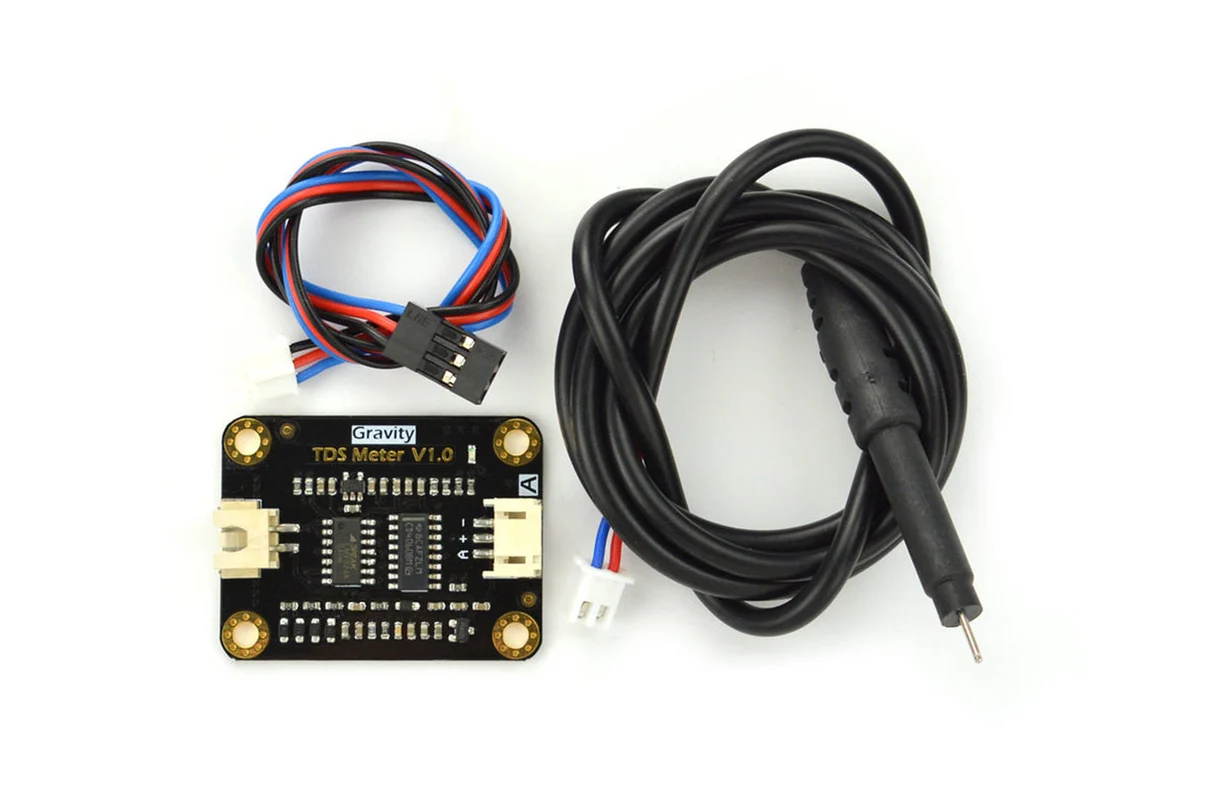
Gravity Analog TDS Sensor Meter For Arduino By DF Robot
₨ 4,500
[yith_wcwl_add_to_wishlist]
Need some help?
Contact Us
Product Ships in
2-3-business Days
Payment Methods:

Gravity Analog TDS Sensor Meter For Arduino By DF Robot | MICROSOLUTION.COM.PK
Product Introduction
Do you care about the quality of the water you drink? The Gravity Analog TDS Sensor Meter For Arduino By DF Robot gives you the power to measure water quality accurately and affordably. This Arduino-compatible sensor kit allows you to monitor Total Dissolved Solids (TDS) in various liquids with professional-grade precision.
TDS indicates the number of soluble solids dissolved in one liter of water. Higher TDS values usually mean more dissolved substances and less clean water. The Gravity Analog TDS Sensor Meter For Arduino By DF Robot helps you understand exactly what is in your water, whether you check tap water, hydroponic solutions, or aquarium conditions.
Water quality matters tremendously in Pakistan. Recent studies show TDS levels in Karachi reaching 380-455 ppm, significantly above the WHO excellent standard of under 300 ppm. The Gravity Analog TDS Sensor Meter For Arduino By DF Robot empowers you to take control of your water quality monitoring.
What makes the Gravity Analog TDS Sensor Meter For Arduino By DF Robot so special? It features a wide 3.3-5.5V input range and outputs a 0-2.3V analog signal compatible with both 5V and 3.3V controllers. The AC excitation source effectively prevents probe polarization and extends the probe's lifespan while increasing output stability.
The Gravity Analog TDS Sensor Meter For Arduino By DF Robot includes a waterproof probe designed for long-term immersion. You can leave it in your hydroponic system or aquarium for continuous monitoring without worrying about damage.
Professional TDS meters cost a fortune, but the Gravity Analog TDS Sensor Meter For Arduino By DF Robot offers exceptional value for Pakistani buyers. You receive a premium-quality sensor kit at an affordable price point that makes water quality monitoring accessible to students, hobbyists, and professionals alike.
The Gravity Analog TDS Sensor Meter For Arduino By DF Robot measures TDS from 0 to 1000 ppm with ±10% accuracy at 25°C. This accuracy range covers most applications, from checking drinking water to monitoring nutrient solutions in hydroponics.
Setting up the Gravity Analog TDS Sensor Meter For Arduino By DF Robot takes just minutes. Simply connect the sensor to your Arduino board, upload the sample code, and start reading TDS values instantly. This plug-and-play design makes the kit perfect for beginners and experienced users.
The Gravity Analog TDS Sensor Meter For Arduino By DF Robot includes comprehensive calibration features. You can calibrate the sensor using known TDS buffer solutions to ensure accurate readings. This attention to precision makes it suitable for serious water quality monitoring projects.
When you choose the Gravity Analog TDS Sensor Meter For Arduino By DF Robot, you invest in reliable water quality monitoring technology trusted by makers, educators, and professionals worldwide.
2️⃣ Key Features
-
Measure TDS levels from 0 to 1000 ppm with professional-grade accuracy.
-
Connect easily to any Arduino board using the simple 3-pin interface.
-
Protect your sensor with the waterproof TDS probe for long-term immersion.
-
Enjoy wide 3.3-5.5V voltage input compatibility for flexible power options.
-
Avoid probe polarization with the AC excitation source that extends sensor life.
-
Integrate seamlessly with 5V or 3.3V controllers using the 0-2.3V analog output.
-
Calibrate the sensor easily using the sample code and serial monitor commands.
-
Build your own TDS meter for domestic water quality testing and monitoring.
-
Monitor hydroponic nutrient solutions accurately for healthier plant growth.
-
Check aquarium water quality to maintain a healthy environment for your fish.
-
Save money compared to professional TDS meters with the same functionality.
-
Read stable measurements with the built-in median filtering algorithm.
-
Compensate readings automatically for temperature variations.
-
Update your water quality monitoring projects with real-time data logging capabilities.
-
Learn about water quality science through hands-on experimentation.
-
Protect your health by testing drinking water TDS levels regularly.
-
Detect water quality issues early with continuous monitoring capability.
-
Share data easily with Arduino serial output for documentation and analysis.
-
Integrate multiple sensors for comprehensive water quality assessment systems.
-
Start measuring immediately with the included sample code and tutorials.
3️⃣ Advanced Features
-
Implement temperature compensation using the built-in formula for accurate readings at varying temperatures.
-
Calibrate the sensor precisely using standard buffer solutions (707ppm recommended).
-
Store calibration parameters in EEPROM for permanent sensor configuration.
-
Use the GravityTDS library for simplified sensor integration and advanced functionality.
-
Read 30 analog samples and apply median filtering for stable output.
-
Deploy the sensor in IoT water quality monitoring systems with Arduino Cloud integration.
-
Create remote water quality dashboards with real-time TDS data visualization.
-
Build automated alert systems that notify you when water quality drops.
-
Design professional water quality monitoring stations for community use.
-
Integrate the sensor with LCD displays for portable TDS meter devices.
-
Develop data logging systems with SD card storage for long-term monitoring.
-
Implement GPS integration to log water quality data by location.
-
Connect multiple TDS sensors for large-scale water monitoring projects.
-
Automate hydroponic systems with continuous TDS monitoring and nutrient adjustment.
-
Build smart water filtration systems that track filter performance over time.
-
Design portable water quality testing kits for field research applications.
-
Create comprehensive water quality reports with serial output data.
-
Develop mobile applications that receive TDS data via Bluetooth or WiFi.
-
Implement machine learning algorithms for predictive water quality analysis.
-
Build edge computing solutions with local data processing and analysis.
4️⃣ Frequently Asked Questions
Q1: What does the Gravity Analog TDS Sensor Meter For Arduino By DF Robot measure?
A: The sensor measures Total Dissolved Solids (TDS) in liquids, indicating the concentration of dissolved substances in water from 0 to 1000 ppm.
Q2: Is the Gravity Analog TDS Sensor Meter For Arduino By DF Robot waterproof?
A: The probe head and cable are waterproof, but the connector and signal transmitter board are not. Keep the electronics dry during use.
Q3: What temperature range can the Gravity Analog TDS Sensor Meter For Arduino By DF Robot handle?
A: Do not use the probe in water above 55°C. The sensor provides the most accurate readings at around 25°C.
Q4: How do I calibrate the Gravity Analog TDS Sensor Meter For Arduino By DF Robot?
A: Upload the sample code, use the serial monitor commands "enter" to enter calibration mode, "cal:707" for a 707ppm solution, and "exit" to save.
Q5: Is the Gravity Analog TDS Sensor Meter For Arduino By DF Robot compatible with all Arduino boards?
A: Yes, the sensor works with all Arduino boards that have analog input pins and provides 0-2.3V analog output.
Q6: What power supply does the Gravity Analog TDS Sensor Meter For Arduino By DF Robot need?
A: The sensor accepts 3.3-5.5V input, making it compatible with both 3.3V and 5V systems.
Q7: How accurate is the Gravity Analog TDS Sensor Meter For Arduino By DF Robot?
A: The sensor provides ±10% F.S. accuracy at 25°C, which is suitable for most water quality monitoring applications.
Q8: Can I use the Gravity Analog TDS Sensor Meter For Arduino By DF Robot for hydroponics?
A: Yes, this sensor works perfectly for monitoring nutrient solution strength in hydroponic systems.
Q9: Does the Gravity Analog TDS Sensor Meter For Arduino By DF Robot include temperature compensation?
A: Yes, the sample code includes temperature compensation functionality for more accurate readings.
Q10: Where can I buy the Gravity Analog TDS Sensor Meter For Arduino By DF Robot in Pakistan?
A: The sensor is available through major electronics retailers across all cities in Pakistan.
5️⃣ Where It Can Be Used
-
Home drinking water testing allows you to verify the quality of your tap or filtered water.
-
Hydroponic systems monitor nutrient solution concentration for optimal plant growth.
-
Aquariums and fish farms maintain appropriate water quality for aquatic life.
-
Educational institutions teach water quality science through hands-on experiments.
-
Community water quality projects test water sources for public health monitoring.
-
Water filtration companies demonstrate filter effectiveness to customers.
-
Agricultural operations check irrigation water quality for crop health.
-
Research laboratories conduct water quality studies and experiments.
-
Environmental monitoring assesses the health of natural water bodies.
-
DIY electronics projects create custom TDS meters and water monitoring devices.
6️⃣ How to Use
Hardware Setup
Start by gathering your Arduino board, the Gravity Analog TDS Sensor Meter, jumper wires, and the liquid you want to test. Connect the sensor to your Arduino board: wire the "GND" pin to ground, the "+" pin to 5V, and the "A" pin to analog input A1 (or any available analog pin).
Software Installation
Download and install the Arduino IDE from the official website. Copy the sample code provided by DF Robot into a new sketch. If you plan to calibrate the sensor, also download and install the GravityTDS library.
Uploading Code
Connect your Arduino board to your computer using the USB cable. Select the correct board type and port in the Arduino IDE. Click the upload button to transfer the code to your board. Open the serial monitor to view the TDS readings.
Calibration (Optional)
For accurate readings, calibrate your sensor. Prepare a known TDS buffer solution (707ppm recommended) or measure a liquid with a reliable TDS pen. Type "enter" in the serial monitor to enter calibration mode. Then type "cal:707" (or the known value) and "exit" to save the calibration.
Taking Measurements
Place the TDS probe in the water sample, ensuring the tip is fully submerged. Wait for the readings to stabilize in the serial monitor. Record the TDS value in parts per million (ppm). Clean and dry the probe between measurements.
Safety Tips
Never use the probe in water above 55°C. Keep the sensor board and connector away from water—only the probe head and cable are waterproof. Do not place the probe too close to the container wall for accurate readings. Handle the sensor board carefully to avoid moisture damage.
Maintenance
Clean the probe thoroughly after each use with distilled water. Store the sensor in a dry, safe place. Periodically check and recalibrate the sensor to maintain accuracy. Replace the probe if readings become unreliable.
7️⃣ Advantages
-
Provides professional-grade measurement at a fraction of the cost of commercial TDS meters.
-
Saves research time with plug-and-play Arduino compatibility and ready-to-use sample code.
-
Ensures measurement accuracy with built-in calibration features and temperature compensation.
-
Supports automated monitoring by integrating with Arduino systems for continuous data collection.
-
Reduces equipment costs by eliminating the need for expensive dedicated TDS testing devices.
-
Enables real-time monitoring with serial output and display integration capabilities.
-
Offers flexible power options with wide 3.3-5.5V voltage compatibility.
-
Facilitates educational use with simple setup and comprehensive documentation.
-
Promotes water safety by empowering users to test drinking water quality independently.
-
Ensures long sensor life with AC excitation preventing probe polarization.
8️⃣ Disadvantages
-
Requires an Arduino board for operation, adding to the total system cost.
-
Needs manual calibration for optimal accuracy, which takes time and standard solutions.
-
Limited measurement range of 0-1000ppm compared to professional instruments.
-
Accuracy tolerance of ±10% is lower than industrial-grade laboratory equipment.
-
Temperature-sensitive measurements require compensation for best results.
-
Not suitable for water temperatures above 55°C.
-
Electronics require protection as only the probe is waterproof.
-
Measurement affected by probe placement near container edges.
-
Requires programming knowledge for custom applications and data handling.
-
Regular maintenance needed to maintain measurement accuracy over time.
9️⃣ City-Wise Sales Coverage in Punjab
The Gravity Analog TDS Sensor Meter For Arduino By DF Robot is available across all major cities in Punjab province. Customers in Lahore, Faisalabad, Rawalpindi, Multan, Gujranwala, Sialkot, Bahawalpur, Sargodha, Rahim Yar Khan, Sheikhupura, Jhang, Dera Ghazi Khan, Gujrat, Okara, Kasur, Sahiwal, Khanewal, Chiniot, Pakpattan, and Vehari can order this professional water quality sensor. Our trusted retail partners ensure fast delivery and authentic DF Robot products throughout the region.
Gravity TDS Sensor Meter For Arduino | Best Price in Pakistan Buy Gravity Analog TDS Sensor Meter For Arduino By DF Robot in Pakistan. Measure water quality accurately with this waterproof TDS sensor kit for hydroponics and home use. Gravity TDS sensor Pakistan, analog TDS meter Arduino, DF Robot water quality sensor, TDS sensor Pakistan, Arduino water quality sensor, TDS meter for Arduino, water quality monitoring, hydroponic TDS sensor, Arduino TDS sensor kit, TDS measurement Pakistan, water quality sensor Pakistan, DF Robot sensor Pakistan, Gravity TDS sensor price, Arduino water sensor, TDS meter kit