Product Page
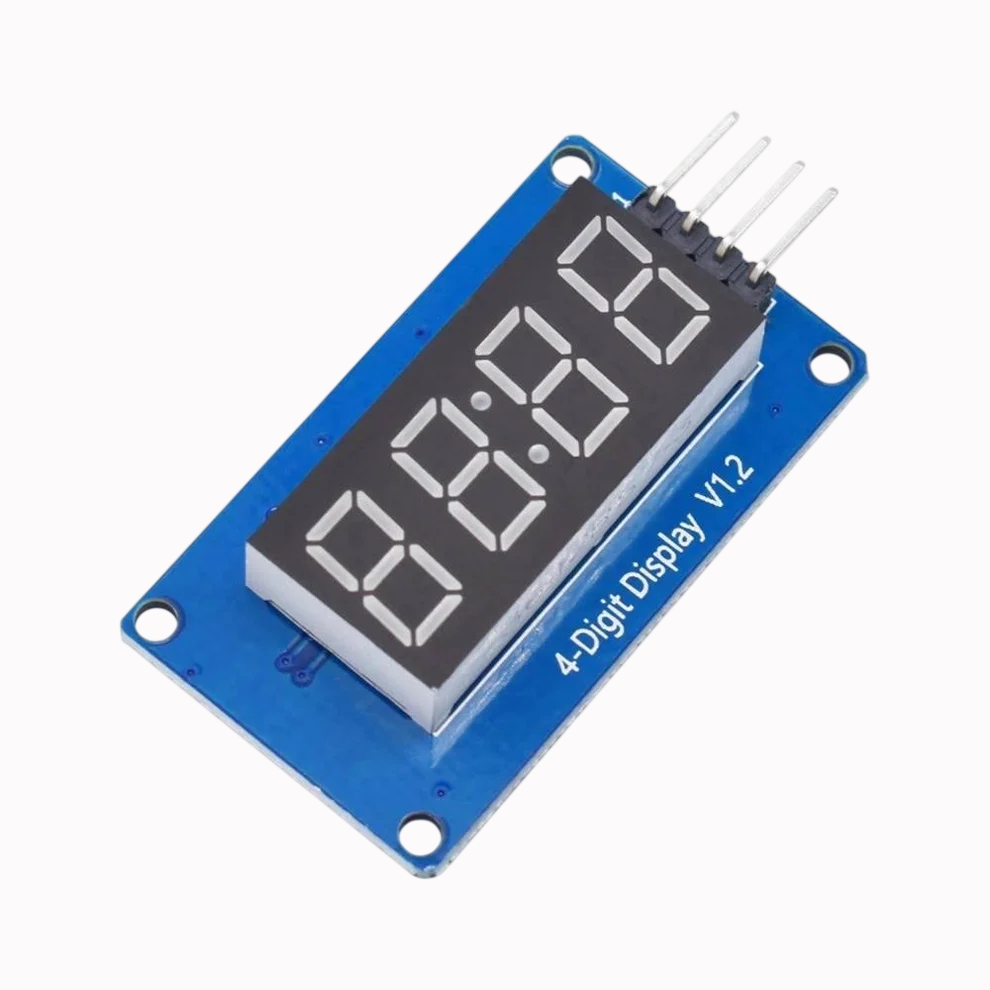
Arduino Tm1637 4 Digit 7 Segment Display Module Led Price
₨ 410
[yith_wcwl_add_to_wishlist]
Need some help?
Contact Us
Product Ships in
2-3-business Days
Payment Methods:

Arduino Tm1637 4 Digit 7 Segment Display Module Led Display Module in Pakistan
Product Introduction
Are you searching for a reliable and affordable way to bring your digital projects to life? Look no further than the Arduino Tm1637 4 Digit 7 Segment Display Module Led Price in microsolutuion.com.pk. This compact yet powerful display module is the perfect solution for students, hobbyists, and professionals across Pakistan. We understand that when you are working on an Arduino project, you need clear, crisp output to display your data. This TM1637 module provides just that, offering a bright and easy-to-read interface for all your numerical and alphanumeric needs. When you check the Arduino Tm1637 4 Digit 7 Segment Display Module Led Price in microsolutuion.com.pk, you will find that we offer the most competitive rates without compromising on quality.
For the Pakistani tech community, from the bustling tech hubs of Lahore to the innovative spaces of Islamabad, getting high-quality components is essential. That's why microsolutuion.com.pk offers this top-tier display module. The Arduino Tm1637 4 Digit 7 Segment Display Module Led Price in microsolutuion.com.pk reflects our commitment to making advanced electronics accessible and affordable for everyone. Whether you are a university student working on a final-year project or a professional developer creating a new prototype, our module offers the perfect blend of performance and durability. We source only the best components to ensure long-lasting reliability in all your creations.
Why choose this module for your next project? The secret lies in its simplicity and power. The TM1637 driver chip simplifies the hardware requirements. It uses only two signal lines (CLK and DIO) to control all four 7-segment displays, saving your Arduino's precious I/O pins for other sensors and components . This efficient design makes it a favorite among developers. At microsolutuion.com.pk, we have priced this module to ensure that Arduino Tm1637 4 Digit 7 Segment Display Module Led Price in microsolutuion.com.pk is unmatched in the Pakistani market.
Building a digital clock, a counter, or a temperature monitoring system has never been easier. We engineer this module for direct compatibility with almost all Arduino boards. The library support is extensive and easy to implement, allowing you to focus on the creative aspects of your project. Discover the best Arduino Tm1637 4 Digit 7 Segment Display Module Led Price in microsolutuion.com.pk and bring your ideas to life today. This module elevates your project's user interface, making it look professional and polished.
We ship this product across Pakistan, ensuring that no matter where you are, you can access high-quality electronics. When you consider the Arduino Tm1637 4 Digit 7 Segment Display Module Led Price in microsolutuion.com.pk, you invest in a component that will enhance your project's functionality. Don't settle for less when you can have the best. Check out the Arduino Tm1637 4 Digit 7 Segment Display Module Led Price in microsolutuion.com.pk now and start building something amazing. From basic counters to advanced automation systems, this display module handles it all with finesse. Our customers trust us for the best prices and the best quality. See why the Arduino Tm1637 4 Digit 7 Segment Display Module Led Price in microsolutuion.com.pk is the best deal in town .
2️⃣ Key Features
-
Simplify your wiring: Use only two control pins to operate this display module.
-
Display numbers clearly: Show numeric values accurately on a bright, easy-to-read LED screen.
-
Save your Arduino pins: Leave more pins free for connecting other sensors and modules .
-
Power up easily: Connect the module using a simple 5V power supply directly from your Arduino .
-
Start programming fast: Use the readily available TM1637 library to display data effortlessly .
-
Build a clock quickly: Create a digital clock with the built-in colon feature for time display .
-
Enhance your prototype: Give your project a professional look with a clean, modular display.
-
Adjust the brightness: Control the display's brightness using software for different lighting conditions .
-
Display sensor data: Show real-time readings from temperature, humidity, or distance sensors .
-
Create a timer: Build countdown timers for kitchens, laboratories, or sports .
-
Reduce complexity: Eliminate messy wiring with the simple 4-pin interface .
-
Make it portable: Use the module with battery-powered Arduino projects thanks to its low power consumption .
-
Ensure accuracy: Get reliable and consistent results with the stable TM1637 driver chip .
-
Mount it securely: Use the pre-drilled holes for easy and secure mounting in your project box .
-
Display on the go: Perfect for projects that require a compact visual output.
-
Read easily in the dark: The bright red LEDs make it visible even in low-light environments .
-
Support 3.3V systems: Compatible with both 3.3V and 5V logic levels .
-
Program easily: Start coding in minutes with simple and well-documented Arduino examples .
-
Build a counter: Easily create digital counters for tracking inventory, people, or events.
-
Upgrade your projects: Move from simple LEDs to a professional display module.
3️⃣ Advanced Features
-
Integrate an RTC: Connect a real-time clock module to create a highly accurate digital clock .
-
Automate systems: Build a smart home device that displays temperature and time simultaneously.
-
Monitor your hardware: Create a custom PC monitoring tool that shows CPU temperature .
-
Display precise metrics: Show data with high precision using decimals and special characters.
-
Control via I2C: Utilize the efficient I2C-like two-wire interface to save resources .
-
Develop custom protocols: Use the display with non-Arduino platforms like ESP8266 and Raspberry Pi .
-
Enhance industrial projects: Implement it in industrial settings for process monitoring .
-
Craft smart agriculture: Build automated systems that display sensor readings for soil and moisture.
-
Utilize the colon: Use the colon to differentiate between hours and minutes in clock projects .
-
Optimize power: Implement software-controlled brightness to extend battery life .
-
Achieve high refresh rates: Enjoy smooth, flicker-free display performance for dynamic data.
-
Design interactive art: Create a digital art piece that uses the display for a unique aesthetic.
-
Engineer robust systems: Depend on the module's robust design for reliable 24/7 operation.
-
Implement diagnostic tools: Build a diagnostic display for your machinery or vehicles .
-
Develop scoring systems: Create a digital scoreboard for games and sports events .
-
Perfect for automation: Integrate the display into larger automated systems for status updates.
-
Show custom characters: Program the display to show basic alphanumeric characters like 'A' and 'b' .
-
Create a lab timer: Build a precise laboratory timer for experiments and procedures .
-
Design a voltmeter: Develop a digital voltmeter or ammeter display .
-
Secure your projects: Use it as a component in a secure lock system that shows PIN entry.
4️⃣ Frequently Asked Questions
Q1: Where can I find the best Arduino Tm1637 4 Digit 7 Segment Display Module Led Price in microsolutuion.com.pk?
Answer: You can find the most competitive Arduino Tm1637 4 Digit 7 Segment Display Module Led Price in microsolutuion.com.pk directly on our website.
Q2: Is this module compatible with an Arduino Uno?
Answer: Yes, it is fully compatible with Arduino Uno and most other development boards .
Q3: How many pins do I need to connect this display?
Answer: You only need to connect two data pins (CLK and DIO) and two power pins (VCC and GND) .
Q4: Can I use this module with a Raspberry Pi?
Answer: Yes, the module works perfectly with both Arduino and Raspberry Pi platforms .
Q5: What kind of projects is this display good for?
Answer: It is ideal for digital clocks, timers, counters, and displaying sensor data .
Q6: Does the display have adjustable brightness?
Answer: Yes, you can easily adjust the brightness using an Arduino library .
Q7: What voltage does this module operate on?
Answer: It operates on both 3.3V and 5V, making it versatile for many boards .
Q8: Do I need a library to use it with Arduino?
Answer: Yes, you will need to install the TM1637 library, which is easily available through the Arduino IDE library manager .
Q9: Is the product available for delivery in Pakistan?
Answer: Yes, we offer fast and reliable delivery across Pakistan, including all major cities .
Q10: What is the Arduino Tm1637 4 Digit 7 Segment Display Module Led Price in microsolutuion.com.pk?
Answer: We offer this high-quality module at a very affordable and competitive price. Please check our website for the latest price.
5️⃣ Where It Can Be Used
-
Digital Clock: Create a simple and elegant digital clock for your desk or home.
-
Arduino Timer: Build a kitchen timer or an industrial countdown timer .
-
Temperature Display: Show real-time data from a temperature and humidity sensor .
-
Digital Counter: Use it as a people counter, object counter, or scoreboard .
-
Speedometer: Display live data from a GPS module for vehicle speed projects.
-
Voltmeter: Build a digital voltmeter to measure and display voltage levels .
-
Smart Home Panel: Integrate into a smart home system to display time or system status.
-
Educational Kits: Include it in STEM education kits for teaching electronics .
-
Robotics Projects: Use it to display system status or error codes in robots.
-
Stock Ticker: Create a device that shows live stock prices or cryptocurrency values.
6️⃣ How to Use
Using the Arduino Tm1637 4 Digit 7 Segment Display Module is remarkably simple. Follow this step-by-step guide to get your display up and running in minutes.
Step 1: Gather Your Materials.
You will need an Arduino board (Uno, Nano, etc.), the TM1637 display module, and four female-to-male jumper wires. Ensure your Arduino IDE is installed on your computer.
Step 2: Connect the Hardware.
Connect the module's VCC pin to the Arduino's 5V output. Connect the GND pin to the Arduino's ground. Then, connect the CLK pin to digital pin 2 and the DIO pin to digital pin 3 on your Arduino . This simple wiring saves your other pins for complex sensors.
Step 3: Install the Library.
Open your Arduino IDE. Navigate to Sketch > Include Library > Manage Libraries. Type "TM1637" in the search bar and install the library by Avishay Orpaz . Having the correct library is crucial for success.
Step 4: Upload the Code.
Go to File > Examples > TM1637 > TM1637Test. This will open a pre-written code. Simply verify and upload the code to your Arduino board. The display will immediately start running a test sequence .
Safety Tips
Always disconnect the power before making any physical connections. Ensure the voltage does not exceed 5V to prevent damage . Double-check your connections to avoid short circuits.
Maintenance Guidance
The TM1637 display is durable and requires minimal maintenance. Keep it in a dry environment to protect the LED segments. Clean it with a soft, dry cloth. Handle it carefully to avoid static discharge, which can damage the IC.
Step 5: Customize Your Data.
To display your own data, use the display.showNumberDec(yourNumber); function in your Arduino sketch to show numbers, or display.setSegments(yourDataArray); for custom characters. Change the code to fit your project's needs.
7️⃣ Advantages
-
Exceptional Value: Get a reliable display at a very low cost .
-
Global Compatibility: Works flawlessly with any microcontroller.
-
Simplified Wiring: Easy 4-pin connection minimizes project assembly time.
-
Saves Resources: Frees up valuable microcontroller pins.
-
Efficient Coding: Simple to program with ready-to-use libraries.
-
Clear Readability: Offers bright, high-contrast visual output in all conditions.
-
Durable Build: Built with quality materials for long-lasting use.
-
Lightweight: Easy to mount in any project enclosure.
-
Versatile: Fits a wide range of applications from home to industrial uses.
-
Trusted Brand: Comes from a reputable supplier in Pakistan.
8️⃣ Disadvantages
-
Limited Characters: You cannot display full words or complex text .
-
Standard Size: The 0.36-inch digits might be too small for some applications .
-
No Color Options: The standard red LED might not match all project aesthetics .
-
Requires Library: You need to install specific library, which can be a barrier for absolute beginners .
-
One Display Only: It is designed for standalone use and not for cascading for large screens.
-
Basic Display: Lacks features like graphical output or touch functionality.
-
Power Dependent: Performance relies on a stable 5V power supply.
-
Pin Dependent: While saving pins, it does require specific digital pins for the two-wire interface.
-
Learning Curve: Beginners may face challenges with the initial wiring or code.
-
Fragile Pins: The header pins can bend if handled roughly.
9️⃣ City-Wise Sales Coverage in Punjab
The Arduino Tm1637 4 Digit 7 Segment Display Module is available for fast shipping across the whole of Punjab. We serve major tech cities including Lahore, Faisalabad, Rawalpindi, Multan, Gujranwala, Sialkot, Bahawalpur, Sargodha, Rahim Yar Khan, Sheikhupura, Jhang, Dera Ghazi Khan, Gujrat, Okara, Kasur, Sahiwal, Khanewal, Chiniot, Pakpattan, and Vehari. Order now and we will deliver this essential component to your doorstep in just a few days.
Arduino TM1637 4 Digit Display Module | Best Price in Pakistan Discover the best Arduino TM1637 4 Digit 7 Segment Display Module in Pakistan. Ideal for clocks and timers. Get top performance at microsolutuion.com.pk today!
-
Arduino TM1637
-
4 Digit Display Module
-
7 Segment Display
-
TM1637 Price in Pakistan
-
Arduino Module Pakistan
-
Digital Clock Display
-
LED Display Module
-
Microsolutuion Pakistan
-
Arduino Components
-
Electronics in Pakistan
-
TM1637 Display
-
Arduino LED Display
-
Project Display Module
-
Timers and Counters
-
Buy Arduino in Pakistan